

Display Source Code in Divi
The Divi Code Snippet Module plugin adds a code snippet module to the standard Divi Builder which you can use just like you would any other Divi Module. It works with Divi, Extra, and the Divi Builder plugin and is Visual Builder compatible.
With all the features you need to display code in your posts:
- Syntax-highlighting
- Automatic language detection
- Pre-designed color schemes
- Support for Divi style options
- Display line numbers
- Control tab widths
- Copy-to-Clipboard button
- Compatible with Supreme AI Writer
Note that the Divi Code Snippet Module is for displaying source code, for example in programming tutorials. If you want to actually run and display the output of PHP code, check out Divi PHP Code module instead!
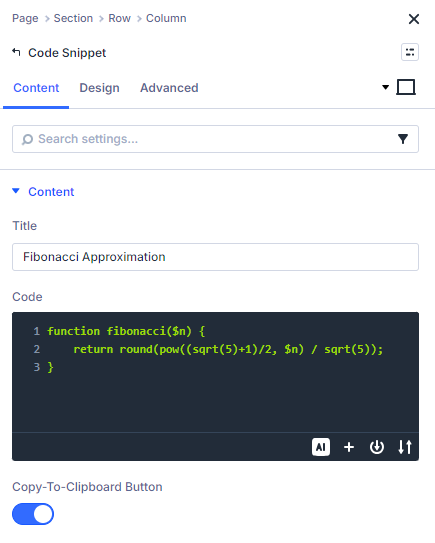
Syntax Highlighting
Make the code in your posts easy to read with the Code Snippet module's clever syntax highlighting. Choose from 73 different color schemes.
// Calculate the nth fibonacci number
function fibonacci($n) {
    return round(pow((sqrt(5)+1)/2, $n) / sqrt(5));
}
// Calculate the nth fibonacci number
function fibonacci($n) {
return round(pow((sqrt(5)+1)/2, $n) / sqrt(5));
}// Calculate the nth fibonacci number
function fibonacci($n) {
return round(pow((sqrt(5)+1)/2, $n) / sqrt(5));
}// Calculate the nth fibonacci number
function fibonacci($n) {
return round(pow((sqrt(5)+1)/2, $n) / sqrt(5));
}// Calculate the nth fibonacci number
function fibonacci($n) {
return round(pow((sqrt(5)+1)/2, $n) / sqrt(5));
}// Calculate the nth fibonacci number
function fibonacci($n) {
return round(pow((sqrt(5)+1)/2, $n) / sqrt(5));
}Full List of Supported Languages
Syntax highlighting is currently supported for the following languages:
1C
Access logs
ARM assembler
AVR assembler
ActionScript
Apache
AppleScript
AsciiDoc
AspectJ
AutoHotkey
AutoIt
Axapta
Bash
Basic
BNF
C
C#
C++
C/AL
Cache Object Script
CMake
CSP
CSS
Cap'n Proto
Clojure
CoffeeScript
Crmsh
Crystal
D
DNS Zone file
DOS
Dart
Delphi
Diff
Django
Dockerfile
DTS (Device Tree)
Dust
Elixir
Elm
Erlang
F#
FIX
Fortran
G-Code
Gams
GAUSS
Gherkin
Go
Golo
Gradle
Groovy
HTML / XML
HTTP
Haml
Handlebars
Haskell
Haxe
Ini
Inform7
IRPF90
JSON
Java
JavaScript
Jinja
Lasso
Less
Lisp
LiveCode Server
LiveScript
Lua
Makefile
Markdown
Mathematica
Matlab
Maxima
Maya Embedded Language
Mercury
Mizar
Mojolicious
Monkey
Moonscript
NSIS
Nginx
Nimrod
Nix
OCaml
Objective C
OpenGL Shading Language
OpenSCAD
Oracle Rules Language
Oxygene
PF
PHP
Parser3
Perl
PowerShell
Processing
Prolog
Protocol Buffers
Puppet
Python
Python profiler results
Q
QML
R
RenderMan RIB
RenderMan RSL
Roboconf
Ruby
Rust
SCSS
SQL
STEP Part 21
Scala
Scheme
Scilab
Smali
Smalltalk
Stan
Stata
Stylus
Swift
Tcl
TeX
Thrift
TP
Twig
TypeScript
VB.Net
VBScript
VHDL
Vala
Verilog
Vim Script
x86 Assembly
XL
XML
XQuery
YAML
Zephir
If you need a syntax highlighting for a language that isn't listed here, please get in touch.
Automatic Language Detection
The Code Snippet Module can automatically detect and perform syntax highlighting for 154 languages. So whichever language you use, your code will look great.
Bash
for i in 1 2 3 4 5
do
    # must have at least one command in loop
    echo $i  # just print value of i
done
C/C++
int sum = 0;
for (int i = 1; i < 6; ++i) {
    sum += i;
}
JavaScript
for (var key in array) {
  // Do something with array[key]
}
Python
for counter in range(1, 6):  # gives values from 1 to 5 inclusive
  # do something here
PHP
for ($i = 0; $i <= 5; $i++)
{
  for ($j = 0; $j <= $i; $j++)
  {
    echo "*";
  }
  echo "<br>";
}
Ruby
5.times do |counter|  # counter iterates from 0 to 4
  # statements
end
Powerful Customization Options
The Code Snippet Module gives you control over how your code is displayed. Add line numbers, adjust tab sizes, or apply custom CSS to get the look you want.
Add Line Numbers
/* Blog Posts */
.et_pb_post {
	margin-bottom: 42px;
}
Fix Tab Sizes
/* Blog Posts */
.et_pb_post {
	margin-bottom: 42px;
}
Add a Click to Copy Button
/* Blog Posts */
.et_pb_post {
	margin-bottom: 42px;
}
Advanced Design Settings
/* Blog Posts */
.et_pb_post {
	margin-bottom: 42px;
}
Custom CSS Support
/* Blog Posts */
.et_pb_post {
	margin-bottom: 42px;
}
Compatible With Your Site and Plugins
Divi Code Snippet module is designed for compatibility with a wide range of site configurations. It is regularly tested on the latest and older versions of PHP and WordPress, as well as with:

Divi
The Divi Code Snippet module is fully compatible with Divi and the Divi Builder plugin. It is regularly tested on the latest version, and is visual builder compatible.

Extra
The Divi Code Snippet module is fully compatible with the Extra theme. It is regularly tested on the latest version, and is visual builder compatible.

Supreme AI Writer
The Divi Code Snippet module is fully compatible with the AI code writing feature of Supreme AI Writer by Divi Supreme, so you can easily generate and display code.