

Add Linked Footnotes to Divi Pages
Add a Footnotes module to your Divi layout, then enter your footnote content and the text you want to match. The module automatically numbers its footnotes and places a numbered link beside the matching text, taking readers directly to its footnote. Display references as superscript and customize the reference text color to match your design.

Customize Footnote Reference Labels
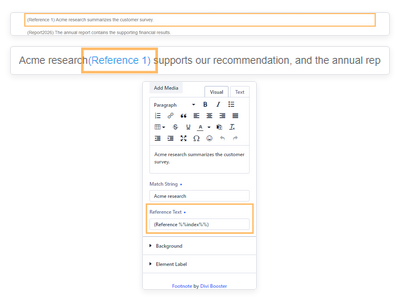
Customize how your footnote references appear, including labels with punctuation such as parentheses. Set Reference Text for each footnote item, and use the %%index%% placeholder to automatically insert its number within the module.
The chosen label appears beside the matched phrase and in the footnotes list, with each reference linked to its corresponding note.
Add Linked Footnotes to Your Divi Pages
Get the Divi Footnotes Module today to give readers easy access to supporting details while keeping your page text clear.