

Want to show a currency symbol, label, or short piece of text before the number in a Divi Circle Counter? Divi does not include a built-in prefix field for the Circle Counter module, but Divi Booster adds a Number Prefix option so you can display values such as $99, +250, from 80, or £1,000 directly inside the counter.
In this guide, I’ll show you how to add the prefix, optionally remove the default percent sign, and style the prefix so it matches the rest of your counter.
Quick answer: Install Divi Booster or the standalone Circle Counter Number Prefix feature file, then open your Circle Counter module and go to Content > Elements > Number Prefix. Enter the text you want to show before the number, then adjust the prefix styling under the module’s Design tab.
How to Add a Prefix Before the Number in a Divi Circle Counter
The easiest way to add text before a Divi Circle Counter number is to use the Number Prefix feature included in Divi Booster, or the standalone feature file if you only need this one option. Once installed, the setting appears directly inside the Circle Counter module, so you can add and style the prefix from the Divi Builder without editing code.
Choose How to Add the Number Prefix Feature
Divi does not include a built-in prefix option for the Circle Counter module, so you’ll first need to install the feature using one of the options below.
Best value: Divi Booster
Divi Booster includes the Circle Counter Number Prefix feature, plus many other Divi fixes and module customizations. Choose this option if you regularly customize Divi sites or want access to more than this one feature.
Single-feature option
Only need this specific Circle Counter prefix feature? You can purchase the standalone feature below.
Circle Counter Module – Text Before Number
Once installed, the new Number Prefix setting will appear in the Circle Counter module settings.
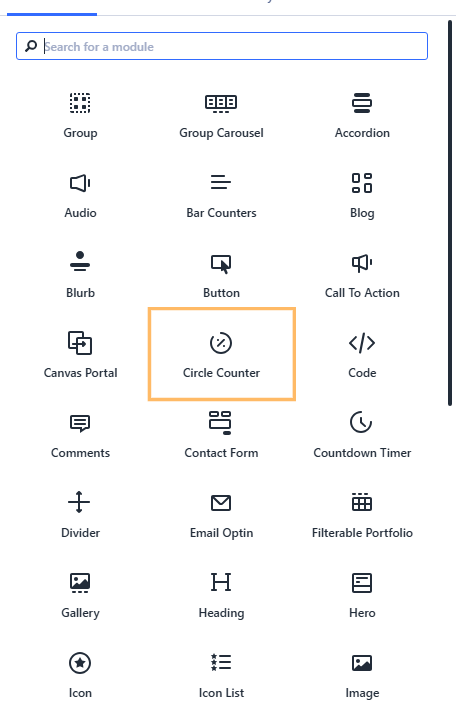
Add or Open Your Circle Counter Module
Open the page in the Divi Builder, then add a new Circle Counter module or open the settings for an existing one. This is the module the prefix will be added to.
Enter the Text to Show Before the Number
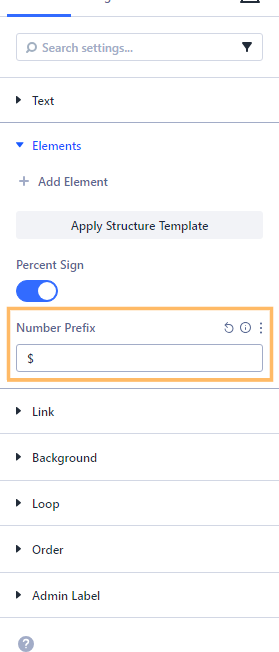
In the Circle Counter settings, go to Content > Elements and enter your prefix in the Number Prefix field. For example, enter $ to show a currency value, + for a positive statistic, or from if the number represents a starting point.
If you do not want Divi’s default percent sign to appear after the number, disable the Percent Sign option in the same section.
Style the Prefix
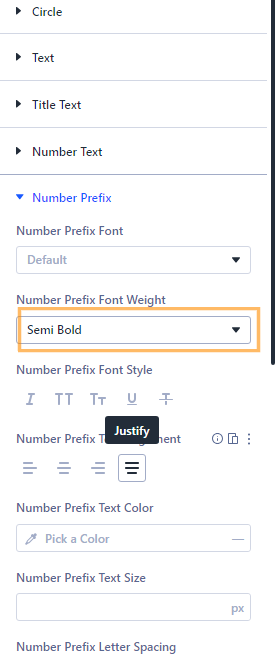
Next, open the Design tab and expand the Number Prefix section. From here, you can adjust the prefix font, size, weight, color, spacing and other styling options so the prefix looks intentional rather than like a separate piece of text.
For example, you might make a currency symbol slightly smaller than the number, or use a lighter font weight for a short word such as “from”.
Save and Check the Front-End Result
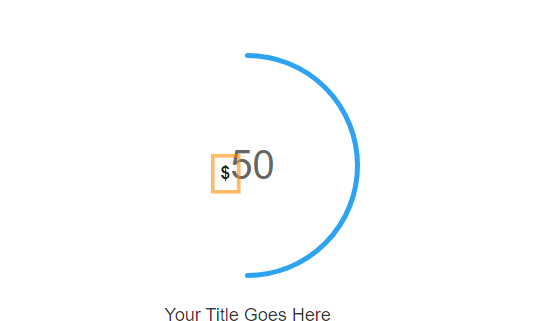
Save the module, publish or update the page, then view it on the front end. Your Circle Counter should now show the prefix before the number. For example, instead of 99%, you could display $99, +99, or from 99 depending on the value you entered.
If the counter still shows a percent sign and you do not want it, return to Content > Elements and turn off Percent Sign.
Continue Customizing Your Counters
Once you’ve added the prefix, you may also want to fine-tune how the counter behaves and how the number is presented. These related fixes are useful next steps:
- Set a custom counter duration – control how quickly the counter animation runs.
- Position the title above the number – change the layout so the label appears before the value.
- Set a custom start value – make the counter begin from a number other than zero.
These small changes can help your counters feel more polished, especially when you’re using them for prices, statistics, milestones, or comparison figures.
FAQ
Can I add a dollar sign before the number in a Divi Circle Counter?
Yes. With the Number Prefix feature installed, open the Circle Counter settings and enter $ in the Number Prefix field.
Can I remove the percent sign from the Divi Circle Counter?
Yes. In the Circle Counter settings, go to Content > Elements and disable the Percent Sign option.
Can I style the prefix separately from the number?
Yes. The feature adds prefix styling controls under the module’s Design tab, so you can adjust the prefix appearance separately.
Can I add text instead of a symbol before the number?
Yes. You can use a symbol such as $ or +, or short text such as from, up to, or over.
Conclusion
Adding a prefix to the Divi Circle Counter is a simple way to make your counters more meaningful, especially when the number represents a currency amount, starting value, positive increase, score, or other non-percentage metric. With the Number Prefix feature installed, you can add the text directly in the Circle Counter settings and style it from the Divi Builder.
From here, think about what else you might want the Circle Counter to do. You may want to adjust the animation speed, change where the title appears, remove the percent sign, or make the counter better match the rest of your design.
If there’s a specific Circle Counter customization you’re trying to achieve, feel free to ask in the comments and I’ll let you know the best way to do it.


0 Comments