
Divi Booster
Customize Divi Without Code - Build Better Sites Faster
- Add powerful new Divi features instantly
- Customize headers, layouts, modules & mobile
- Save hours on every site build
Compatible with Divi 4 & 5
Compatible with Divi 4 & 5
WP 6.9+ Compatible
Why Divi Booster?
Saves You Time
Build your site faster with less effort:
- Fix common Divi issues in seconds
- Avoid hunting for code snippets
- Skip hours of CSS and troubleshooting
Less time fixing. More time building.
Packed with Features
Get the settings Divi is missing:
- Add 100+ new Divi settings
- Extend modules with powerful settings
- Control every part of your site
Everything you need in one plugin.
Easy to Use
Using Divi Booster is simple:
- Install the plugin
- Enable the features you want
- Instantly improve your site
No coding. No complexity.
"Divi Booster is a great product and we’ve never really needed support for it but, on the one occasion we needed advice, Dan was super helpful." – Will Nuttall, Absolute Media
Trusted by 33,000+ users on 75,000+ sites for over 10 years
See what you can do with Divi Booster
Add powerful new controls across Divi and its modules – without writing code.
Enhanced Divi Modules
Add powerful new controls to Divi’s built-in modules
Extend blog, gallery, video, and more
Add missing settings directly where you need them
Customize modules without CSS

Header & Navigation
Customize your Divi header in minutes – no code required
Rearrange header elements
Customize sticky header behavior
Improve dropdown menus and spacing


Social & Custom Icons
Add and customize icons across your site
250+ additional social icons
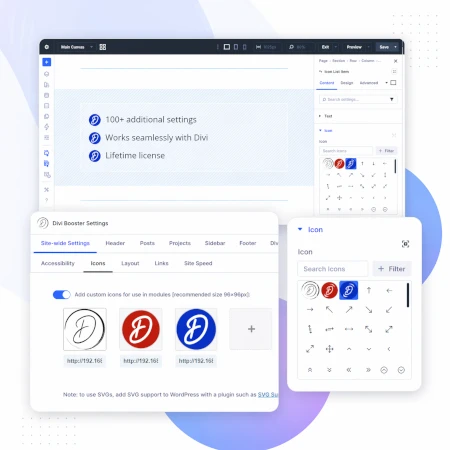
Upload your own custom icons
Use icons across multiple Divi modules

Blog & Content Enhancements
Improve how your blog content looks and works
List tags in your blog modules
Filter the blog module by author
Customize pagination text


Gallery & Media Control
Take full control of images and sliders
Customize sliders and navigation
Control image sizing and layout
Disable unwanted animations

Accordion & Counters
Make interactive elements more flexible
Start accordions open or closed
Let users fully collapse sections
Customize counter behavior and timing

Video Module Enhancements
Get more control over your video modules
Autoplay, mute, and loop videos
Hide player controls
Limit YouTube related videos
Contact Form Improvements
Make your forms more powerful and reliable
Send confirmation emails automatically
Block spam by email, domain, or keyword
Developer & Advanced Tools
Extra control when you need it
Built-in CSS manager
Optimize JS and CSS loading
Import and export settings
And Lots, Lots More…
Divi Booster comes packed with everything you need to build more powerful and awesome Divi sites in less time
Trusted by Divi Users Worldwide
"Divi Booster is a great product and we’ve never really needed support for it but, on the one occasion we needed advice, Dan was super helpful."
"This plugin does exactly what I needed it to do. I do not have any developer skills, but support was excellent and resolved all of the questions I had quickly."
"Divi Booster is fantastic. I used this plugin to improve the header area and footer area on a client's website. My client is very pleased."
Frequently Asked Questions
What is Divi Booster?
Divi Booster is a WordPress plugin that adds 100+ new features and customization options to the Divi theme. It lets you modify layouts, modules, headers, and more – without writing code.
Do I need coding knowledge to use Divi Booster?
No. Divi Booster is designed for non-developers as well as professionals. You simply install the plugin and enable the features you want – no CSS, PHP, or JavaScript required.
Does Divi Booster work with Divi 5?
Yes. Divi Booster is actively maintained and compatible with both Divi 4 and Divi 5, with regular updates to ensure ongoing compatibility.
Can I use Divi Booster on client websites?
Yes. You can use Divi Booster on client sites. The 3-site and unlimited licenses are especially popular with freelancers and agencies building multiple websites.
What kind of features does Divi Booster add?
Divi Booster adds a wide range of enhancements, including:
- Additional settings for Divi modules
- Header and navigation customization
- Blog and content improvements
- Layout and spacing controls
- Lots more icons
Overall, it gives you much more control over how Divi works – without needing custom code.
Will Divi Booster slow down my website?
No. Divi Booster is designed to be lightweight. You can enable only the features you need, so unnecessary code isn’t loaded. In some cases, it can even help improve performance by reducing the need for custom scripts.
How is Divi Booster different from other Divi plugins?
Divi Booster focuses on adding practical, real-world improvements to Divi – things users frequently need when building sites. Instead of being a niche add-on, it acts as an all-in-one toolkit to extend Divi’s core functionality.
How do I install Divi Booster?
After purchase, you download the plugin file and upload it via your WordPress dashboard (Plugins → Add New → Upload Plugin). Once activated, you can enable features directly within Divi.
Do you offer support and updates?
Yes. Divi Booster includes ongoing updates and support. The plugin has been maintained for over 10 years, with regular compatibility updates for new versions of WordPress and Divi.
Is there a refund policy?
Yes. If Divi Booster isn’t the right fit for your needs, you can request a refund within the specified refund period (90 days).
Can I enable or disable individual features?
Yes. Divi Booster is modular – you can turn features on or off individually, so you only use what you need for each site.
Where can I see the full feature list?
You can view the complete list of features here:
Hey, can I install divi booster on all my sites? or just 1 site?
thanks.
Hi doron, you can use it on all your sites. There is no need for you to buy a new copy for each site. Thanks!
Hello Dan,
There is a warning message appearing on the WP Plugin V2.7.2 =
Warning: This plugin has not been tested with your current version of WordPress.
I am running 4.9.5
Is this plugin OK to download and apply to the site?
I look forward to hearing from you.
Thanks,
Barrie
Hi Barrie, while Divi Booster 2.7.2 was released when WP version 4.9.4 was out (and hence is marked as being tested only up to that version), it is working correctly with WP 4.9.5 and is okay to download / apply to your site. The next version of Divi Booster (2.7.3) will be marked as having been tested up to WP 4.9.5 and so won't produce this error. I hope that helps!
Hi Dan.
Can you please refund me for this as I did not recieve the e-mail and have not yet had a response, it has been a number of days now.
Thanks.
Nadia
Hi Nadia, I'm really sorry I wasn't able to answer this earlier. It looks like there was a typo in the email address entered at checkout which would explain why you didn't receive the download link. I've put through the refund as requested. Thanks!
Hello Dan,
I just watched the full tutorial for your plugin (great info btw) and I would love to purchase it! Before I do, can you tell me if it is compatible with the Extra theme?
Thank you!
Serena
Hey Serena, it will run on Extra and many, though not all, features will work. This post explains in more detail:
https://divibooster.com/is-divi-booster-compatible-with-the-extra-theme/
I hope that helps!
Hello Dan,
I just watched the full tutorial for your plugin and I would love to purchase it! Before I do, can you tell me if it is compatible with the Extra theme?
Thank you!
Serena
Hey Serena, it will run on Extra and many, though not all, features will work. This post explains in more detail:
https://divibooster.com/is-divi-booster-compatible-with-the-extra-theme/
I hope that helps!
ok no problem, look at this link the price table is at the end.
http://174.142.214.153/sitio/?page_id=50438
Hey chuck, it looks like the + / – icons are being hidden by a bit of custom CSS you have added elsewhere, specifically:
.mitabla .et_pb_pricing_content .et_pb_pricing li span:before {
    display: none!important;
}
I can see this CSS being included in Divi's combined CSS, so I'm guessing it has been added in the one of Divi's custom CSS boxes. Hopefully you recognize where. If you remove it, the icons should start working.
Hi, I have problems with the Pricing Table in Divi Booster, I have selected all the options but the x and the + sign are not shown in the table.
Hey chuck, is there any chance you can send me a link to the page you're working on so that I can take a look? Cheers.
I bought divi booster plugin, I would like to find a guide to learn about the plugin. Someone can find me? Thank's
Hey Giuseppe, here's a video that covers most of the Divi Booster features, which you might find useful:
https://divibooster.com/divi-booster-tutorial-video/
How do I update from version 1.8.2? Check for updates does nothing.
Figured it out. Just went back to my original purchase email and used the download link.
Great! Something must have been stopping the automatic update feature from picking up the latest version – if it happens again, let me know. Cheers!
Hello Dan,
The new privacy liscence in Europe require a selection field if they signup for something the can select a field for send me newsletter.
Can you add something for the optin module?
Btw Great Plugin
Hey Erwin, thanks for the suggestion. I'll do my best to include an option for this in a future update. Cheers!
IT WORKS!
Please disregard my previous post (I'm glad it's still awaiting moderation–just remove it).
Must have taken awhile for the Divi Booster to show up in the Customizer, or maybe I just didn't see it.
The addition of the LinkedIn link and icon were easy and they look great. Thank you!
BTW I really appreciate that this is not a subscription, and that it can be used on many sites. (I'm willing to pay for a multi-site price, but not subscriptions.) Thanks again.
Thanks Chaz :) I’m glad you got the result you wanted! I’ve removed your earlier comment.
Hi Dan,
I need to have a social icon for "Yelp" for my top header and footer area. Is there a way to achieve this? Thanks so much!
Hi Kathryn, yes there is. With Divi Booster installed, go to "Divi > Theme Customizer > Divi Booster > Social Media Icons". Then click on "Add a Network" and click on the box that appears. Select "Yelp" from the icon list and add the URL of the Yelp page you want the icon to link to. The Yelp icon will now show up in the top header and and footer area of the site preview. Click to "Publish" the customizer settings and the icon will be added to the site itself. I hope that makes sense, but let me know if you have any trouble getting it to work. Thanks!
Hi Dan,
I would like to purchase Divi Booster, but I am not sure how to use it.
Hi Yesi, here's a video that shows of many of the plugin's features:
https://divibooster.com/divi-booster-tutorial-video/
Hopefully that gives you an idea of how to use it, but let me know if you have any questions. Thanks!