
In this quick tutorial, I’ll show you how to hide a Divi module when scrolling in a specific direction (up or down), so that the module only shows when you want it to. This is especially useful when using Divi’s Scroll Effects feature and you have a effect you want to play as the user scrolls down, but don't want playing in "reverse" as they scroll back up.
Add the Scroll Detection Code
Paste the following code into your site. You can do this either:
In the "Divi > Theme Options > Integration > Add code to the head of your blog" section, or
In a Code Module anywhere on your page
<script>
(function() {
  let lastScrollTop = 0;
  let body = document.body;

  window.addEventListener("scroll", function() {
    let currentScroll = window.pageYOffset || document.documentElement.scrollTop;

    if (currentScroll > lastScrollTop) {
      body.classList.add("db-scrolling-down");
      body.classList.remove("db-scrolling-up");
    } else if (currentScroll < lastScrollTop) {
      body.classList.add("db-scrolling-up");
      body.classList.remove("db-scrolling-down");
    }

    lastScrollTop = currentScroll <= 0 ? 0 : currentScroll;
  }, false);
})();
</script>

<style>
body.db-scrolling-up .db-hide-on-scroll-up,
body.db-scrolling-down .db-hide-on-scroll-down {
  opacity: 0;
  pointer-events: none;
  transition: opacity 0.3s ease;
}
</style>
Add a Class to Your Module
To control which modules hide on scroll:
To hide a module when scrolling down, add the class:
db-hide-on-scroll-downTo hide a module when scrolling up, add the class:
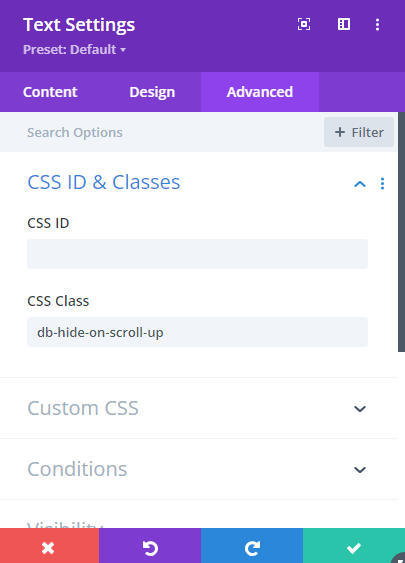
db-hide-on-scroll-up
You can apply this class to any module, row, or section via the "Advanced > CSS ID & Classes > CSS Class" setting.
That’s It!
Now you have full control over which modules show or hide depending on the user’s scroll direction — a simple way to make your Divi site feel more intentional and polished.


0 Comments