
Divi Booster
Customize Divi Without Code - Build Better Sites Faster
- Add powerful new Divi features instantly
- Customize headers, layouts, modules & mobile
- Save hours on every site build
Compatible with Divi 4 & 5
Compatible with Divi 4 & 5
WP 7.0 Compatible
Why Divi Booster?
Saves You Time
Build your site faster with less effort:
- Fix common Divi issues in seconds
- Avoid hunting for code snippets
- Skip hours of CSS and troubleshooting
Less time fixing. More time building.
Packed with Features
Get the settings Divi is missing:
- Add 100+ new Divi settings
- Extend modules with powerful settings
- Control every part of your site
Everything you need in one plugin.
Easy to Use
Using Divi Booster is simple:
- Install the plugin
- Enable the features you want
- Instantly improve your site
No coding. No complexity.
"Divi Booster is a great product and we’ve never really needed support for it but, on the one occasion we needed advice, Dan was super helpful." – Will Nuttall, Absolute Media
Trusted by 33,000+ users on 75,000+ sites for over 10 years
See what you can do with Divi Booster
Add powerful new controls across Divi and its modules – without writing code.
Enhanced Divi Modules
Add powerful new controls to Divi’s built-in modules
Extend blog, gallery, video, and more
Add missing settings directly where you need them
Customize modules without CSS

Header & Navigation
Customize your Divi header in minutes – no code required
Rearrange header elements
Customize sticky header behavior
Improve dropdown menus and spacing


Social & Custom Icons
Add and customize icons across your site
250+ additional social icons
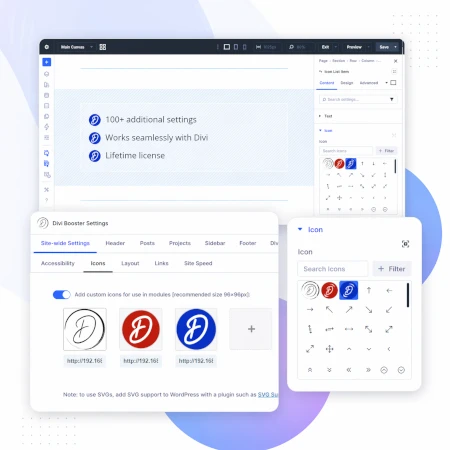
Upload your own custom icons
Use icons across multiple Divi modules

Blog & Content Enhancements
Improve how your blog content looks and works
List tags in your blog modules
Filter the blog module by author
Customize pagination text


Gallery & Media Control
Take full control of images and sliders
Customize sliders and navigation
Control image sizing and layout
Disable unwanted animations

Accordion & Counters
Make interactive elements more flexible
Start accordions open or closed
Let users fully collapse sections
Customize counter behavior and timing

Video Module Enhancements
Get more control over your video modules
Autoplay, mute, and loop videos
Hide player controls
Limit YouTube related videos
Contact Form Improvements
Make your forms more powerful and reliable
Send confirmation emails automatically
Block spam by email, domain, or keyword
Developer & Advanced Tools
Extra control when you need it
Built-in CSS manager
Optimize JS and CSS loading
Import and export settings
And Lots, Lots More…
Divi Booster comes packed with everything you need to build more powerful and awesome Divi sites in less time
Trusted by Divi Users Worldwide
"Divi Booster is a great product and we’ve never really needed support for it but, on the one occasion we needed advice, Dan was super helpful."
"This plugin does exactly what I needed it to do. I do not have any developer skills, but support was excellent and resolved all of the questions I had quickly."
"Divi Booster is fantastic. I used this plugin to improve the header area and footer area on a client's website. My client is very pleased."
Frequently Asked Questions
What is Divi Booster?
Divi Booster is a WordPress plugin that adds 100+ new features and customization options to the Divi theme. It lets you modify layouts, modules, headers, and more – without writing code.
Do I need coding knowledge to use Divi Booster?
No. Divi Booster is designed for non-developers as well as professionals. You simply install the plugin and enable the features you want – no CSS, PHP, or JavaScript required.
Does Divi Booster work with Divi 5?
Yes. Divi Booster is actively maintained and compatible with both Divi 4 and Divi 5, with regular updates to ensure ongoing compatibility.
Can I use Divi Booster on client websites?
Yes. You can use Divi Booster on client sites. The 3-site and unlimited licenses are especially popular with freelancers and agencies building multiple websites.
What kind of features does Divi Booster add?
Divi Booster adds a wide range of enhancements, including:
- Additional settings for Divi modules
- Header and navigation customization
- Blog and content improvements
- Layout and spacing controls
- Lots more icons
Overall, it gives you much more control over how Divi works – without needing custom code.
Will Divi Booster slow down my website?
No. Divi Booster is designed to be lightweight. You can enable only the features you need, so unnecessary code isn’t loaded. In some cases, it can even help improve performance by reducing the need for custom scripts.
How is Divi Booster different from other Divi plugins?
Divi Booster focuses on adding practical, real-world improvements to Divi – things users frequently need when building sites. Instead of being a niche add-on, it acts as an all-in-one toolkit to extend Divi’s core functionality.
How do I install Divi Booster?
After purchase, you download the plugin file and upload it via your WordPress dashboard (Plugins → Add New → Upload Plugin). Once activated, you can enable features directly within Divi.
Do you offer support and updates?
Yes. Divi Booster includes ongoing updates and support. The plugin has been maintained for over 10 years, with regular compatibility updates for new versions of WordPress and Divi.
Is there a refund policy?
Yes. If Divi Booster isn’t the right fit for your needs, you can request a refund within the specified refund period (90 days).
Can I enable or disable individual features?
Yes. Divi Booster is modular – you can turn features on or off individually, so you only use what you need for each site.
Where can I see the full feature list?
You can view the complete list of features here:
So glad the slider bar went away :-) Thanks Dan. I am having an issue with centering footer menu. It will not center.
Hi El A. It looks like putting paragraph tags in the footer html box breaks the formatting and consequently the centering. I've release an update to the plugin which should fix this. Let me know if you are still having issues with it after updating.
Hi Dan,
Most useful plugin ;-) Have used the replace footer links function.
I thought "Great, I won't have to use a child theme!"
However, my client requires social icons.
They have a Facebook, Twitter, Instagram and LinkedIn Account.
Divi, only supports the first two from its interface.
Unless, I'm mistaken … this forces me to use a child theme as I need to interact with PHP files.
The social icon status of Divi is woefully inadequate … the world is on Instagram, LI, Pinterest, Youtube, etc.
The value proposition of your plugin is compromised .. I may as well create a child theme and do all my changes from that … if I've got to go through the rigmarole of doing it all anyway. Just my thinking … not a criticism…
Am I mistaken? If not … could I suggest …
1) The ability to add further social icons.
2) The ability to open social pages in a new window i.e. _blank. Thatll be javascript I think.
Many Thanks
Regards Mark
Hey Mark,
Yeah, Divi is a bit sparse on social media icons. However, Elegant Themes have released a plugin called Monarch (which you can download for free if you already have an Elegant Themes subscription). It supports 35 social networks and allows you to add a variety of social icons in a variety of places. Probably you're best bet would be to see if Monarch can give you the effect you're after. If it doesn't, let me know and I'll see if I can help out. I'll try and avoid duplicating Monarch functionality in Divi Booster (as I can add more value by working on other features), but I'm happy to add social media icon related options that Monarch doesn't offer.
Hope that helps!
Dan
Hi Dan,
Monarch focuses on social sharing … not as a springboard to each social platform to view them. It promotes sharing from the "off". I proposed this to my client and they said "Yeah, that's great but can you get the icons to link to the pages directly?"
So I'm trying to work out how to not have to use a child theme to add an instagram and youtube link into the Divi top header … all the icons are described by CSS classes … in fact I can change the class in Chrome Inspector … and actually see the two icons that I need. "Maybe some clever CSS will do it?" I ask myself.
You've got to ask yourself … how many people want an RSS function as opposed to Instagram and Youtube? … Who was in that meeting when they came up with this?
But then there is the question of opening in a new window as opposed to opening in the same window … another flaw that requires Javascript
I think your plugin is ideal for this. I will use this function for every client I deal with. Yes there are good social plugins … but this is a basic theme offering that has been woefully underestimated.
Your plugin, as you have stated, is for those features that are difficult to get going … usually combining a little CSS with php and javascript.
In a nutshell … you will not be competing in any way with Monarch .. unless I'm mistaken. You will be adding to core functionality … and a very useful one.
What says you Dan (before i go off and start with tghis child theme lark ;-)
Regards Mark
Ha! You've convinced me! I haven't really played with Monarch much, so I wasn't aware it didn't do this. I can't give you a timeline for getting this done as I have a lot of other features in the pipeline too, but I'll try to get to it as soon as possible and let you know when I have.
Dan,
I've been thinking about this.
Divi is touted as good for beginners … will not have to touch code, etc
Social icon status is such that you can only use facebook, twitter, google+ and RSS feed in header/footer etc.
The combination of this requirement for most businesses is probably less than 1%.
These icons can't be changed … unless you wan't to edit the social_icons.php file … which means a child theme would be sensible … this is not a beginner-ready theme … unless the beginner is fortunate to be in the 1% of those requiring the magic combination provided in Divi.
But social is everything … and people want to springboard users to their social sites … in a new window … something else you can't do without editing social_icons.php
We've established Monarch is for sharing NOT springboarding.
This would be a great feature to generate uptake of your plugin. It would be touted across the facebook users group and as a better alternative to articles like this: http://www.eileenlonergan.com/adding-social-media-icons-to-the-footer-of-divi-for-linkedin-pinterest-youtube-instagram
Thanks Dan … Hope you can add this soon ;-)
Hey Mark, You're absolutely right, Divi needs more options for this. At the moment I'm working on addressing the various bugs that have surfaced as a result of launching the plugin and having a lot of different people testing the plugin on different systems. As soon as I've got that under control I'll be starting to add new features. I'll keep you posted on progress, but the social icons are high up there on the list of planned features.
Hey Mark. Good news! I've updated the plugin to add more social media icons to Divi (linkedin, pinterest, instagram, youtube, and some others). The option can be found in the "General" section of the Divi Booster settings.
When I change or resize something with Divi Booster, does it still show on mobile devices correctly? I bought CSS Hero and it doesn't. I wasted my money.
Hey Will, as I develop all the Divi Booster options myself, I'm able to make sure they work correctly on mobiles (unlike CSS Hero which puts that burden on you). For some of the newer options where I haven't yet developed a robust mobile version, Divi Booster defaults to the standard Divi appearance.
that is good news. I think I will give it a go.
Thanks Will. Let me know if there is anything that doesn't seem up to scratch and I'll do my best to improve it.
Hey Dan!
Great stuff with the Booster plugin! :) Just wondering if we're able to remove the sidebar for product pages? :) That's my only concern :(
Thanks Leo, it's not currently an option in the plugin, but I'll add it to my feature requests list and hopefully will be able to add it in a future update.
Hi, Divi Booster is a great add-on, thank you very much!
But I find it's very hard to move the sliders to specific values.
I tried to set a slider to 300px but I can't get it. It's always 297 or 304…
It would be great if I can enter the desired amount of pixels at the and of the line instead of trying to reach it with the slider.
Regards,
Han
Ha ha! Everyone is having trouble with the sliders! I'll be removing them very soon. In the meantime, you can click on the slider handle and then use the arrow keys on the keyboard to adjust the sliders by one pixel at a time.
LOL, thanks for the workaround.
The sliders are no more, Han! I've removed them in the latest update :)
That's fast! Thanx
Thank you for this wonderful plugin!
Divi refinements requiring hours of torment were magically turned into minutes of pure bliss. Your Divi Booster plugin paid for itself on the first day and is one of the best purchases I've ever made.
What would make this amazing plugin even better? The ability to use double-bit character sets (like Japanese, Chinese and Korean characters) on the following text fields:
Add text before menu button (mobiles): [text field]
Replace footer links with this text / HTML: [text field]
When I put Japanese characters into either of these fields they were not properly saved and the fields would show garbled text the next time I loaded the Divi Booster settings page. I'm using WordPress version 4.1.1-jp. If you need any other info from me or would like me to test it out for you, please let me know and I'd be happy to do so.
Also, the "Make Divi Faster" option (optimizations such as stripping out the CSS for unused components) would be pure gold! Please make this your priority!
Again, thank you for your amazing plugin! Bravo!
You're more than welcome, Steve!
Thanks for the suggestion, I'll try to add the extended character support to a future version of the plugin. And I'll definitely be looking into a "Make Divi Faster" option :)
Hi Dan, this is truly brilliant. Helps with a lot of things that I've been scratching my head over. I'm not a developer, so getting into code is not my thing. Your plugin works brilliantly.
I do have one request though…I'm setting up an ecommerce site, using woocommerce as suggested by divi/elegant themes. I can use page builder on the shop, basket and checkout pages….but on the products pages, it reverts back to the default page. With the annoying little logo etc
I've tried to use page builder on the products page….but it doesn't work….it adds the page builder part to the product description.
Do you have any plans to make this part of your booster?
Drives me nuts not to have consistency on the pages in my site…makes it look clunky to me!!
Thanks very much….
Hey Barbara, I haven't played around with woocommerce much, so I hadn't noticed the behavior you mention. But I've had a few other people ask about woocommerce so I'll aim to spend some time working on woocommerce fixes at some point and I'll definitely take a look at the pagebuilder inconsistencies then. Thanks!
Great plugin, thanks. Here's a suggestion for future consideration. Divi blog pagination is weak. Defaults to "Older Entries" "Newer Entries". Also, single page pagination doesn't exist at all. When I look on the ET Divi support, they say, "go find a plugin." There's not much out there that looks trust-worthy and up-to-date. Love to see Divi Booster address that.
Hey stump, I'll see what I can do :)
Great plugin. I've previously made some suggestions which I hope will make a future release but here's an extra improvement which I have found difficult. On sections such as the logo size and header height there is a slider than sets the pixel size. The slider is difficult to set a specific value. I was trying to set it to 97px and I just could not get to that value. Move the slider 1 micron to the left and the value jumps 10px and the same for the right. To be able to set the value manually would be better and time saving.
Steven, I'll be fixing this shortly. In the meantime you can click on the slider and then use the left and right arrows to adjust the value by one at a time.
Hey Steven, I've now replaced the sliders with standard input boxes, so it should be nicer to use now!
Does this incorporate the ability to add the semi transparent background to the slider text?
Hi Carmella. Yes, it includes the ability to add the semi transparent background.
It puts a blank background on any slides in the slider that don't have any text on it though… it's a tricky one for me to figure out since each slide in the slider module can't have its own separate css ID. Hmm…
Hey Randall, I've updated the plugin to fix this. The latest update also lets you specify the background color and opacity.
WOOT – I contributed! :) thanks Dan…
Great plug-in – and a absolut must have for divi user!
My first usage was to change the footer but the copyright sign © can not be displayed.
Maybe I did something wrong?
Hey Joachim. The footer box accepts HTML code, so you need to enter the HTML code for the copyright symbol, which is: ©
Hi Dan, I just purchased your plugin yesterday and am really happy with it. I have two suggestions:
1. I would like an option to enable comment totals for the Blog module, like something that says "3 Comments" and links you to the post's comment section.
2. When I'm adding CSS to your plugin's CSS Manager field, if I try to add something to the bottom of the text box it keeps auto-scrolling me up to the top of the CSS Manager every time I type in a character. To prevent this, I have to add new CSS to the top of the text field.
Hey Matt, thanks for the suggestions :) I'm currently fixing up bugs found during the launch so I'll hopefully be able to get a fix for the CSS manager issue done soon. I'll look into the comment counts after that. Cheers!