

If you are using Yoast SEO with Divi 5, you may find that Yoast reports little or no content on pages built with Divi, even though the page clearly contains plenty of text.
This happens because Divi 5 stores page content in a new format which is different from the shortcode-based format used by earlier versions of Divi. At the time of writing, Yoast SEO does not yet understand this new Divi 5 content structure, so its SEO and readability analysis tools are not able to detect the text or images inside your Divi modules.
Hopefully Yoast or Elegant Themes will add native Divi 5 compatibility in the near future. Until then, the free plugin below provides a simple way to bridge the gap and allow Yoast SEO to analyse your Divi 5 content correctly.
Fix Yoast SEO Not Detecting Divi 5 Content with Our Free Plugin
Our free Yoast SEO – Divi 5 Compatibility plugin passes Yoast SEO the text and images stored inside Divi 5 modules so that its SEO and readability checks can work as expected.
You can download the plugin from the sidebar, then use it as follows:
Install and Activate the Plugin
Download the plugin, upload it to your WordPress site, and activate it in the normal way from the Plugins screen.
Once activated, the plugin works automatically in the background. There are no settings to configure.

Run the SEO or Readability Scan on Your Page
Open a page built with Divi 5 and view the Yoast SEO analysis or readability analysis.
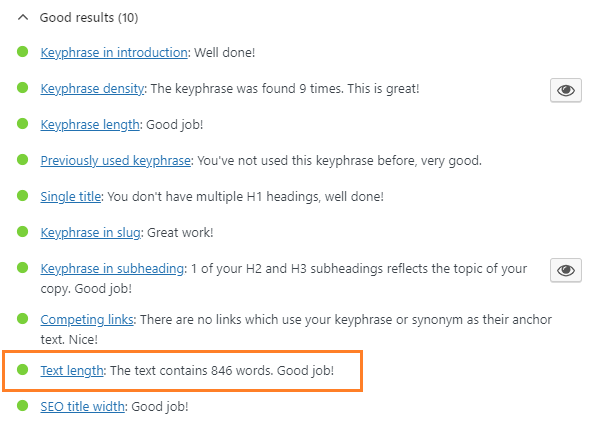
Yoast should now be able to retrieve the page content correctly. One useful sign that it is working is that the text length shown by Yoast in the SEO analysis should now reflect the actual amount of text on the page, rather than appearing empty or much too low.
Test the Highlighting Feature
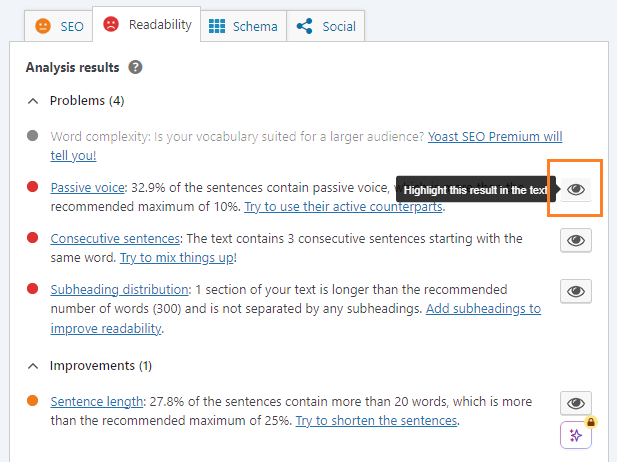
You can also test one of the report items that supports highlighting. Our plugin also hooks this up to work on Divi 5 pages, letting you see exactly where any SEO / readability issues are located.
Click the relevant eye / highlight icon in Yoast SEO. The page should open in a new tab, with the matching text highlighted on the rendered Divi 5 page. This helps make the Yoast feedback easier to review and act on, just as it would on a non-Divi page.
Increase your Visibility in Google
Once you've got Yoast SEO up and running in Divi 5, a great next step is to increase your search engine visibility is to add a Google "add to preferred sources" button, to your site. The preferred sources button gives your readers a one-click way to tell Google that they value your site and want to see more content from it.
The easiest way to add a Google preferred sources button to Divi 5 is using our Divi Preferred Sources Module.
Conclusion
Until Yoast SEO or Divi adds official support for Divi 5 content analysis, the free Yoast SEO – Divi 5 Compatibility plugin offers a straightforward workaround that restores Yoast’s content detection and highlighting features for Divi 5 pages.
If you have any questions about using the plugin, feel free to leave a comment below.


Excellent plugin. Thank you very much for creating and sharing it. However, I have one question: unfortunately, the highlight function is not working for me. The eye icon is inactive (grey instead of black). Where should I look for the issue? Thank you.
You're very welcome, Jozef. Are you able to click on the icons? On my test site, they are working and show as in the screenshot above – i.e. they have a grey box normally, and on hover the grey box disappears leaving just the eye icon, and the tooltip appears. So all the icons in the screenshot above represent active highlight buttons despite (to me) looking somewhat greyed-out / inactive.
But assuming your icons are indeed inactive and do nothing when clicked, would it be possible for me to login and take a look? If so, please can you send through login details via the contact form? If that's not possible, no worries. Perhaps you could instead send through a screenshot so that I can get an idea of what you're seeing? To do that, please send a message through the contact form and you'll get an auto-response to which you can attach the screenshot. Thanks!
Awesome plugin Dan – it even allows Yoast to do the 'seo optimisation' process that it fell-over on before I added your plugin – thanks a million
I'm glad it's helping, Paul! Thanks :)
This is fantastic, thanks for releasing it. I was about to abandon Divi for new site builds and switch to Elementor because of the lack of compatibility with Divi 5 and Yoast. Now I can continue with my preferred builder.
You're welcome, Daniel! Glad it's saving you some hassle :)