
A subtle animated top border can be a nice way to add movement and polish to your Divi layouts. It works particularly well on cards, blurbs, pricing tables, call-to-action modules, menu-style links, and other elements where you want a small interaction effect without making the design feel too busy.
This type of effect is often suited to modern, minimal, SaaS-style, portfolio, agency, and business websites. It can help make interactive elements feel more responsive, guide the user’s attention, and add a little extra visual feedback when someone hovers over an item.
In this tutorial, I’ll show you how to create this effect in Divi using a small amount of CSS.
Try It Out
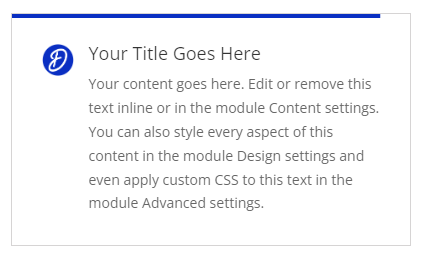
Hover over this blurb module to see the animated top border slide smoothly into place from left to right.
Adding the Hover Border Effect with CSS
This method adds a thin bar to the top of the selected Divi module. The bar is hidden by default, then smoothly animates from left to right when the user hovers over the module.
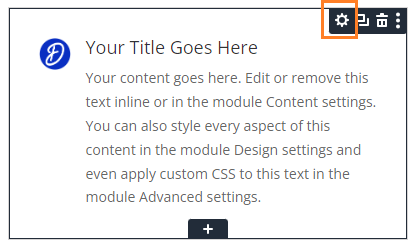
Open the Module Settings
First, open the settings for the Divi module you want to apply the effect to. This could be a Blurb module, Call to Action module, Text module, or another module where you want the animated top border to appear.
Add the Custom CSS
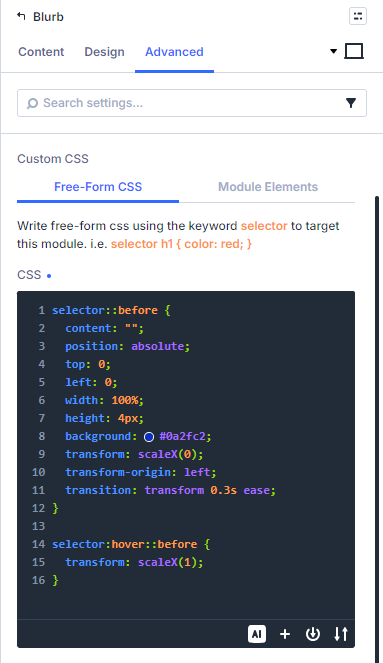
In the module settings, go to Advanced > Custom CSS > Free-Form CSS and add the following CSS:
selector::before {
	content: "";
	position: absolute;
	top: 0;
	left: 0;
	width: 100%;
	height: 4px;
	background: #0a2fc2;
	transform: scaleX(0);
	transform-origin: left;
	transition: transform 0.3s ease;
}

selector:hover::before {
	transform: scaleX(1);
}
This creates the top bar and animates it into view when the module is hovered.
Save and View the Page
Save the module, then save the page and view it on the front-end of your site. When you hover over the module, the blue bar should animate smoothly from left to right across the top of the module.
If needed, you can adjust the thickness of the bar by changing the height value, or change the colour by editing the background value.
Conclusion
This is a simple way to add a smooth animated hover border effect to Divi modules using CSS. It can be a nice finishing touch for card-style layouts, feature sections, service boxes, and other interactive elements.
If you’re trying to create a different hover effect or would like to modify this one further, feel free to leave a comment below.

0 Comments