
The Divi Tooltip module can sometimes unexpectedly hide the tooltip when the mouse moves from the tooltip back onto the element that triggered it. The tooltip closes even though the user is still hovering the area that should keep it open. In this guide, we’ll add a small JavaScript workaround and adjust the tooltip close delay to smooth out the behavior.

Fix the Divi Tooltip Mouseout Issue with JavaScript
This workaround lets Divi handle tooltip closing as normal, but restores the parent hover state when the mouse leaves the tooltip and lands back inside the parent module.
Add the Tooltip Fix Script
Go to: Divi → Theme Options → Integration
Enable the option to add code to the body, then paste this into the “Add code to the <body>” box:
<script>
(function () {
  var TOOLTIP_SELECTOR = '.et_pb_tooltip';
  var loadedFlag = 'dbDiviTooltipHoverFixLoaded';

  function isDiviBuilder() {
    var classText = [
      document.documentElement && document.documentElement.className,
      document.body && document.body.className
    ].join(' ');

    if (/\b(et-fb|et_fb|et-bfb|et_fb_preview_active|et_pb_preview)\b/.test(classText)) {
      return true;
    }

    if (/[?&](et_fb|et_bfb|et_builder)=1\b/.test(window.location.search)) {
      return true;
    }

    if (document.querySelector('#et-fb-app, .et-fb-app, .et-fb-root-ancestor')) {
      return true;
    }

    try {
      if (
        window.parent &&
        window.parent !== window &&
        window.parent.document &&
        window.parent.document.querySelector('#et-fb-app, .et-fb-app, .et-fb-root-ancestor')
      ) {
        return true;
      }
    } catch (e) {}

    return false;
  }

  if (isDiviBuilder() || window[loadedFlag]) {
    return;
  }

  window[loadedFlag] = true;

  var attachedTooltips = new WeakSet();
  var parentCache = new WeakMap();
  var observer = null;

  function findParentModule(tooltip) {
    var element = tooltip.parentElement;

    while (element) {
      if (
        element.classList &&
        element.classList.contains('et_pb_module') &&
        !element.classList.contains('et_pb_tooltip')
      ) {
        return element;
      }

      element = element.parentElement;
    }

    return null;
  }

  function getParentModule(tooltip) {
    var cached = parentCache.get(tooltip);

    if (cached && cached.isConnected && cached.contains(tooltip)) {
      return cached;
    }

    var parent = findParentModule(tooltip);

    if (parent) {
      parentCache.set(tooltip, parent);
    }

    return parent;
  }

  function dispatchHoverEvent(element, type, sourceEvent, relatedTarget, bubbles) {
    element.dispatchEvent(new MouseEvent(type, {
      bubbles: bubbles,
      cancelable: true,
      view: window,
      clientX: sourceEvent.clientX,
      clientY: sourceEvent.clientY,
      screenX: sourceEvent.screenX,
      screenY: sourceEvent.screenY,
      relatedTarget: relatedTarget
    }));
  }

  function restoreParentHover(event) {
    var tooltip = event.currentTarget;
    var parent = getParentModule(tooltip);

    if (!parent) {
      return;
    }

    window.requestAnimationFrame(function () {
      var elementUnderPointer = document.elementFromPoint(event.clientX, event.clientY);

      if (!elementUnderPointer || !parent.contains(elementUnderPointer)) {
        return;
      }

      dispatchHoverEvent(parent, 'mouseover', event, tooltip, true);
      dispatchHoverEvent(parent, 'mouseenter', event, tooltip, false);
    });
  }

  function attachTooltip(tooltip) {
    if (!tooltip || attachedTooltips.has(tooltip)) {
      return;
    }

    attachedTooltips.add(tooltip);
    tooltip.addEventListener('mouseleave', restoreParentHover);
  }

  function attachTooltipsIn(root) {
    if (!root || root.nodeType !== 1) {
      return;
    }

    if (root.matches && root.matches(TOOLTIP_SELECTOR)) {
      attachTooltip(root);
    }

    if (root.querySelectorAll) {
      root.querySelectorAll(TOOLTIP_SELECTOR).forEach(attachTooltip);
    }
  }

  function start() {
    if (isDiviBuilder()) {
      return;
    }

    attachTooltipsIn(document.body || document.documentElement);

    observer = new MutationObserver(function (mutations) {
      if (isDiviBuilder()) {
        observer.disconnect();
        return;
      }

      mutations.forEach(function (mutation) {
        mutation.addedNodes.forEach(attachTooltipsIn);
      });
    });

    observer.observe(document.body || document.documentElement, {
      childList: true,
      subtree: true
    });
  }

  if (document.readyState === 'loading') {
    document.addEventListener('DOMContentLoaded', start);
  } else {
    start();
  }
})();
</script>
Save the changes.
Set a Short Tooltip Close Delay
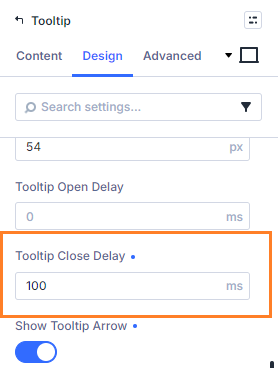
To avoid a brief flicker as the tooltip state is restored, open the Tooltip module settings and go to:
Tooltip → Design → Tooltip → Tooltip Close Delay
Set the close delay to 100ms.
This gives the hover fix enough time to re-trigger the parent hover state without making the tooltip feel slow to close.
Save and Test the Tooltip
Save the page and test the tooltip on the front end.
Move the mouse from the parent element into the tooltip, then back from the tooltip onto the parent element. The tooltip should now stay open instead of closing unexpectedly.
Take it Further
Now that the tooltip hover behavior is working smoothly, you might want to make the tooltip itself more visually useful by adding an icon.
See the guide: How to Add an Icon to the Divi Tooltip Module
Conclusion
This small JavaScript fix helps the Divi Tooltip module behave as expected when the tooltip overlaps its parent element. Combined with a short close delay, it prevents the tooltip from disappearing just as the user moves back onto the element that opened it.
If there's anything else you're trying to get working on the Divi 5 Tooltip module, feel free to share the details in the comments.


0 Comments