
Divi Booster
Customize Divi Without Code - Build Better Sites Faster
- Add powerful new Divi features instantly
- Customize headers, layouts, modules & mobile
- Save hours on every site build
Compatible with Divi 4 & 5
Compatible with Divi 4 & 5
WP 6.9+ Compatible
Why Divi Booster?
Saves You Time
Build your site faster with less effort:
- Fix common Divi issues in seconds
- Avoid hunting for code snippets
- Skip hours of CSS and troubleshooting
Less time fixing. More time building.
Packed with Features
Get the settings Divi is missing:
- Add 100+ new Divi settings
- Extend modules with powerful settings
- Control every part of your site
Everything you need in one plugin.
Easy to Use
Using Divi Booster is simple:
- Install the plugin
- Enable the features you want
- Instantly improve your site
No coding. No complexity.
"Divi Booster is a great product and we’ve never really needed support for it but, on the one occasion we needed advice, Dan was super helpful." – Will Nuttall, Absolute Media
Trusted by 33,000+ users on 75,000+ sites for over 10 years
See what you can do with Divi Booster
Add powerful new controls across Divi and its modules – without writing code.
Enhanced Divi Modules
Add powerful new controls to Divi’s built-in modules
Extend blog, gallery, video, and more
Add missing settings directly where you need them
Customize modules without CSS

Header & Navigation
Customize your Divi header in minutes – no code required
Rearrange header elements
Customize sticky header behavior
Improve dropdown menus and spacing


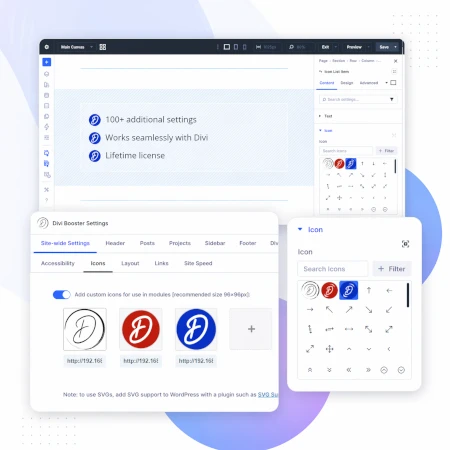
Social & Custom Icons
Add and customize icons across your site
250+ additional social icons
Upload your own custom icons
Use icons across multiple Divi modules

Blog & Content Enhancements
Improve how your blog content looks and works
List tags in your blog modules
Filter the blog module by author
Customize pagination text


Gallery & Media Control
Take full control of images and sliders
Customize sliders and navigation
Control image sizing and layout
Disable unwanted animations

Accordion & Counters
Make interactive elements more flexible
Start accordions open or closed
Let users fully collapse sections
Customize counter behavior and timing

Video Module Enhancements
Get more control over your video modules
Autoplay, mute, and loop videos
Hide player controls
Limit YouTube related videos
Contact Form Improvements
Make your forms more powerful and reliable
Send confirmation emails automatically
Block spam by email, domain, or keyword
Developer & Advanced Tools
Extra control when you need it
Built-in CSS manager
Optimize JS and CSS loading
Import and export settings
And Lots, Lots More…
Divi Booster comes packed with everything you need to build more powerful and awesome Divi sites in less time
Trusted by Divi Users Worldwide
"Divi Booster is a great product and we’ve never really needed support for it but, on the one occasion we needed advice, Dan was super helpful."
"This plugin does exactly what I needed it to do. I do not have any developer skills, but support was excellent and resolved all of the questions I had quickly."
"Divi Booster is fantastic. I used this plugin to improve the header area and footer area on a client's website. My client is very pleased."
Frequently Asked Questions
What is Divi Booster?
Divi Booster is a WordPress plugin that adds 100+ new features and customization options to the Divi theme. It lets you modify layouts, modules, headers, and more – without writing code.
Do I need coding knowledge to use Divi Booster?
No. Divi Booster is designed for non-developers as well as professionals. You simply install the plugin and enable the features you want – no CSS, PHP, or JavaScript required.
Does Divi Booster work with Divi 5?
Yes. Divi Booster is actively maintained and compatible with both Divi 4 and Divi 5, with regular updates to ensure ongoing compatibility.
Can I use Divi Booster on client websites?
Yes. You can use Divi Booster on client sites. The 3-site and unlimited licenses are especially popular with freelancers and agencies building multiple websites.
What kind of features does Divi Booster add?
Divi Booster adds a wide range of enhancements, including:
- Additional settings for Divi modules
- Header and navigation customization
- Blog and content improvements
- Layout and spacing controls
- Lots more icons
Overall, it gives you much more control over how Divi works – without needing custom code.
Will Divi Booster slow down my website?
No. Divi Booster is designed to be lightweight. You can enable only the features you need, so unnecessary code isn’t loaded. In some cases, it can even help improve performance by reducing the need for custom scripts.
How is Divi Booster different from other Divi plugins?
Divi Booster focuses on adding practical, real-world improvements to Divi – things users frequently need when building sites. Instead of being a niche add-on, it acts as an all-in-one toolkit to extend Divi’s core functionality.
How do I install Divi Booster?
After purchase, you download the plugin file and upload it via your WordPress dashboard (Plugins → Add New → Upload Plugin). Once activated, you can enable features directly within Divi.
Do you offer support and updates?
Yes. Divi Booster includes ongoing updates and support. The plugin has been maintained for over 10 years, with regular compatibility updates for new versions of WordPress and Divi.
Is there a refund policy?
Yes. If Divi Booster isn’t the right fit for your needs, you can request a refund within the specified refund period (90 days).
Can I enable or disable individual features?
Yes. Divi Booster is modular – you can turn features on or off individually, so you only use what you need for each site.
Where can I see the full feature list?
You can view the complete list of features here:
Hi Dan! Just purchased the plugin, but there is nothing in my purchase entry. Also, I have not yet received the mail regarding my login details. Thanks!
Hi Neh, hopefully those details came through (sometimes it takes a little while). I've just resent your purchase confirmation email which contains the download link / license key, but let me know if you are still waiting on anything. Thanks!
Hello,
Can I use Divi Booster with the plugin Divi Page Builder (and not directly the Divi theme) ?
Thanks
Pending your reply.
Ludovic
Hi Ludovic, yes you can use Divi Booster with the Divi Builder plugin, on themes other than Divi. Note though that not all features will apply to / work on other themes. This post explains in more detail:
https://divibooster.com/is-divi-booster-compatible-with-the-divi-builder-plugin/
I think my problem was due to a WordPress update; it seems to be working fine now.
Hi Dan,
I recently bought DiviBooster and I like it :-)
It is good but still lacks few things I would love to have. So I google a way to submit improvement request and I did a search on "Divibooster Forum" and it gave me this page:
https://divibooster.com/forum-registration/
It is basically not working…
So here is what I would like to do and I hope you will find a way to help me.
On the fulldwidth header I would like to have an image on the left and some code on the right. A bit like this : http://craftedbygc.com/
I also tried with a standard section but it did not work as it is not fullwidth.
Thanks for your help
Nic
Please could you reply ? And why is it saying "Your comment is awaiting moderation. "
Hi Nicolas, I've just posted a reply. As most comments are direct questions to me I typically keep them in my moderation queue until I'm able to answer them properly.
Hi Nic, the forum page is an old one – thanks for bringing it to my attention. I've just removed it.
I can see two main ways of doing this. One is to lay it out using the fullwidth header, but just putting an image on the right. You could then use some JavaScript / jQuery to replace this image with an element containing your code. Whether you can do this or not would depend on what code you want to add.
Alternatively, I think you can actually get quite close using a standard section. If you set a background image on the standard section, it will be displayed full width, but not full height. To make it full height you can add the following to standard sections custom CSS tab under Main Element:
This sets its height to 100% of the browser window. Once you've done that, you should be able to layout the standard section with image, text and code modules to get the layout you want. You may also want to use the divider module or module padding to get things positioned nicely vertically.
First of all… THANK you so much for Divi Booster.
It is a huge Blessing to all of the Divi users.
Secondly, I have a question. (You seem to be the Divi expert who answers questions).
My logo used to look quite good. High resolution.
At some point, with an update of the theme or of wordpress, I am not sure which, it became pixelated.
The original file is smooth and fresh. I have re-uploaded it, but still looks terrible on the site.
My website is SoundTables.com if you want to check it out.
I suspect it's something simple.
I appreciate any help.
Note: at the same time, on another Divi site I own, the same thing happened. So this fix will be double helpful.
Super THANKS!!!
You're welcome, Thomas :)
This seems to be the classic problem that IE is really bad at resizing images. When I look on IE it is badly pixelated, but on Chrome it looks smooth.
I've put together a quick post with some further details / advice:
https://divibooster.com/fixing-your-pixelated-divi-logo/
As your source logo is very large, I'd definitely recommend resizing it down to the height it is eventually displayed at (54px). This should solve the pixelation problem and as a bonus help speed up the site.
Hello Dan,
I just purchased your Divi Booster for a particular feature that does not seem to be there.
What I need is to remove the menu completely in the header and also on the mobile, but keep the header with the logo in place.
Is that something that you can add?
URL is: photosbyfrans.com
I will stay with the Booster as it has many other features that are very useful.
Thank you,
Frans
Hi Frans, the feature is actually in there. It's under "Deprecated > Divi 2.3 > Hide header links and search". Note that it's in the "Deprecated" section as it's now possible to achieve the same effect within Divi itself. To do so, you can hide the search icon through the customizer and remove all items from the menu. But the Divi Booster feature still works and you may wish to use it if you find it more convenient.
I just had to unistall Divi Booster as it was breaking my Divi site. All of the animations and other javascript wasn't functioning with Divi Booster activated. As soon as I Deactivated it, everything started working again. I was getting an issue:
waypoints.min.js?ver=2.7.1:7 Uncaught Error: No handler option passed to Waypoint constructor
I don't know why this is happening.. but it makes the plugin unusable. It was suppose to make it easy to confuigure Divi sites, but it only broke the site.
Hi Robert, I'm sorry to hear this. It sounds like you're running an older version of Divi Booster, while running the latest version of Divi. Recent versions of Divi have changed the way the header works, in such a way that they are unfortunately incompatible with my original implementations of the features for stopping the header from shrinking. I released an update to Divi Booster to address this, so if you update to the latest version of Divi Booster, the problem should go away. Let me know if you continue to have problems with it.
OK. How Do I download the latest version? Do I need to pay again?
Hi Rob, no need to pay again. This post explains how to update your copy:
https://divibooster.com/updating-divi-booster-plugin/
Thanks man.
I just purchased Divi Booster and I already LOVE it. I think I have a suggestion though… Unless I am missing something I think you forgot Twitter in the social media section. I am trying to find an easy way to add a twitter profile. Thanks for the awesome plugin!
Thanks Justin! There is already an option to add the Twitter profile in Divi (under "Divi > Theme Options > General > Twitter Profile URL), which is why I haven't included Twitter in the list of extra social media icons that Divi Booster adds.
I am having the same problem. I just did updates and the Divi Booster is totally messing up my site. All my blog links lead to a 404 page. Doesn't make any sense.
Hi Kajal, I'm sorry to hear this. It sounds like a different problem – I think something is messing up your site's permalinks. The first thing to try would be rebuild the permalinks by going to "Settings > Permalinks" in your WordPress dashboard and re-save the settings. This rebuilds your site's permalinks and should (hopefully) fix the issue. If not, you may need to delete the .htaccess file in your WordPress's main folder (make a copy first) and then repeat the above. Let me know if you are still having problems after that.
I really want to give Divi Booster a go, but the only thing I am struggeling with is support for the plugin. How long are you planning to develop the plugin? I am just afraid of plugin development stops one day and I have to do a lot of modifications manually on all sites I manage for my customers, e.g. when a new major version of Divi comes out.
Hi Patty, I completely understand your concerns. I plan to keep on developing Divi Booster for as long as people keep on using Divi, and hope I will be able to do so. Of course there are no guarantees in life and it makes sense that you do what you need to avoid problems down the track. My suggestion for you would be to develop the site first in plain Divi, and then consider using Divi Booster to add polish. By this I mean don't use Divi Booster for any critical layout changes, but rather for the smaller tweaks which help to perfect your sites (which is what most of Divi Booster's features are anyway). That way, if you ever needed to you could disable Divi Booster (or individual Divi Booster features) without causing problems on the sites or forcing you to do a lot of manual modifications. Anyway, as I say, I plan to keep developing Divi Booster for as long as I can and will try to hand it over to someone else if I'm unable to continue developing it for some reason. I hope that answers the question for you.
Feature Request: Social Media Icon and Link for Houzz.
I have many clients in the interior design, home staging, home services categories and would love to see this added so I can be lazy and use Divi Booster for it!
I love Divi Booster! Thanks for all the hard work on this guys!
Hi Brian, I'll definitely try to add the Houzz icon into a future version, and will let you know if / when I do. Thanks!
HI, Does you booster plugin work with the new DIVI 2.7?
Hi Rich, yes the plugin is compatible with Divi 2.7 :)
Hi!
I really liked the Booster plugin when I first got it, but now it's not working for me anymore. I wanted to use it to add extra social icons, but they are not displaying anymore. It used to be random, but now it doesn't work at all. I'm actually pretty disappointed. Do you have any advice?
Thanks,
Jenny
Hi Jenny, this sounds like a conflict which used to occur when you install certain caching plugins. I've fixed it in the latest version of Divi Booster, so if you update hopefully that will fix the problem.
Hi Dan,
I posted a comment (and I can't find it now) asking if the plugin included the ability to add the widget below the header. Seeing how you posted the code to make the change DIY, I rolled the dice that it was included. I purchased the plugin and it was there! You can ignore that other comment since I couldn't find it to update it. :)
Also, I wanted to say that this an awesome plugin! Divi, in my opinion, is the best theme for WordPress hands down. Your plugin saves a lot of time (which is money) for a lot of nice additions to Divi. It is certainly worth the money if you equate time to money — which I do!
Thanks again and I look forward to seeing future releases!
Cheers,
Joe
PS – I am running Divi 2.6.6 and I am having no issues with Divi Booster.
Thanks Joe! It's great to hear that you're finding it useful :)
I try to keep the site and plugin in sync so that all the Divi tips posted on the site are available in the plugin and vice versa.