
Divi Booster
Customize Divi Without Code - Build Better Sites Faster
- Add powerful new Divi features instantly
- Customize headers, layouts, modules & mobile
- Save hours on every site build
Compatible with Divi 4 & 5
Compatible with Divi 4 & 5
WP 6.9+ Compatible
Why Divi Booster?
Saves You Time
Build your site faster with less effort:
- Fix common Divi issues in seconds
- Avoid hunting for code snippets
- Skip hours of CSS and troubleshooting
Less time fixing. More time building.
Packed with Features
Get the settings Divi is missing:
- Add 100+ new Divi settings
- Extend modules with powerful settings
- Control every part of your site
Everything you need in one plugin.
Easy to Use
Using Divi Booster is simple:
- Install the plugin
- Enable the features you want
- Instantly improve your site
No coding. No complexity.
"Divi Booster is a great product and we’ve never really needed support for it but, on the one occasion we needed advice, Dan was super helpful." – Will Nuttall, Absolute Media
Trusted by 33,000+ users on 75,000+ sites for over 10 years
See what you can do with Divi Booster
Add powerful new controls across Divi and its modules – without writing code.
Enhanced Divi Modules
Add powerful new controls to Divi’s built-in modules
Extend blog, gallery, video, and more
Add missing settings directly where you need them
Customize modules without CSS

Header & Navigation
Customize your Divi header in minutes – no code required
Rearrange header elements
Customize sticky header behavior
Improve dropdown menus and spacing


Social & Custom Icons
Add and customize icons across your site
250+ additional social icons
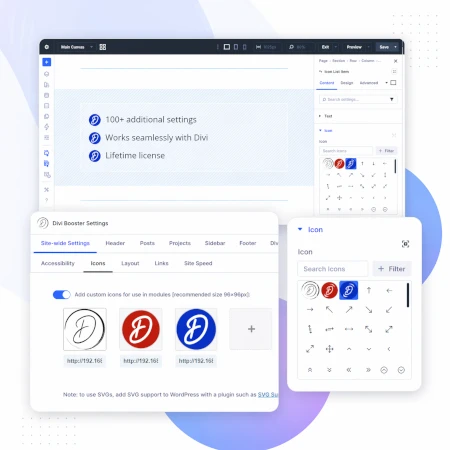
Upload your own custom icons
Use icons across multiple Divi modules

Blog & Content Enhancements
Improve how your blog content looks and works
List tags in your blog modules
Filter the blog module by author
Customize pagination text


Gallery & Media Control
Take full control of images and sliders
Customize sliders and navigation
Control image sizing and layout
Disable unwanted animations

Accordion & Counters
Make interactive elements more flexible
Start accordions open or closed
Let users fully collapse sections
Customize counter behavior and timing

Video Module Enhancements
Get more control over your video modules
Autoplay, mute, and loop videos
Hide player controls
Limit YouTube related videos
Contact Form Improvements
Make your forms more powerful and reliable
Send confirmation emails automatically
Block spam by email, domain, or keyword
Developer & Advanced Tools
Extra control when you need it
Built-in CSS manager
Optimize JS and CSS loading
Import and export settings
And Lots, Lots More…
Divi Booster comes packed with everything you need to build more powerful and awesome Divi sites in less time
Trusted by Divi Users Worldwide
"Divi Booster is a great product and we’ve never really needed support for it but, on the one occasion we needed advice, Dan was super helpful."
"This plugin does exactly what I needed it to do. I do not have any developer skills, but support was excellent and resolved all of the questions I had quickly."
"Divi Booster is fantastic. I used this plugin to improve the header area and footer area on a client's website. My client is very pleased."
Frequently Asked Questions
What is Divi Booster?
Divi Booster is a WordPress plugin that adds 100+ new features and customization options to the Divi theme. It lets you modify layouts, modules, headers, and more – without writing code.
Do I need coding knowledge to use Divi Booster?
No. Divi Booster is designed for non-developers as well as professionals. You simply install the plugin and enable the features you want – no CSS, PHP, or JavaScript required.
Does Divi Booster work with Divi 5?
Yes. Divi Booster is actively maintained and compatible with both Divi 4 and Divi 5, with regular updates to ensure ongoing compatibility.
Can I use Divi Booster on client websites?
Yes. You can use Divi Booster on client sites. The 3-site and unlimited licenses are especially popular with freelancers and agencies building multiple websites.
What kind of features does Divi Booster add?
Divi Booster adds a wide range of enhancements, including:
- Additional settings for Divi modules
- Header and navigation customization
- Blog and content improvements
- Layout and spacing controls
- Lots more icons
Overall, it gives you much more control over how Divi works – without needing custom code.
Will Divi Booster slow down my website?
No. Divi Booster is designed to be lightweight. You can enable only the features you need, so unnecessary code isn’t loaded. In some cases, it can even help improve performance by reducing the need for custom scripts.
How is Divi Booster different from other Divi plugins?
Divi Booster focuses on adding practical, real-world improvements to Divi – things users frequently need when building sites. Instead of being a niche add-on, it acts as an all-in-one toolkit to extend Divi’s core functionality.
How do I install Divi Booster?
After purchase, you download the plugin file and upload it via your WordPress dashboard (Plugins → Add New → Upload Plugin). Once activated, you can enable features directly within Divi.
Do you offer support and updates?
Yes. Divi Booster includes ongoing updates and support. The plugin has been maintained for over 10 years, with regular compatibility updates for new versions of WordPress and Divi.
Is there a refund policy?
Yes. If Divi Booster isn’t the right fit for your needs, you can request a refund within the specified refund period (90 days).
Can I enable or disable individual features?
Yes. Divi Booster is modular – you can turn features on or off individually, so you only use what you need for each site.
Where can I see the full feature list?
You can view the complete list of features here:
Is there a option to add or change the hover effect on pictures with the plugin?
I consider to buy the plugin…
Hope it is.
Regards,
Ray
Hi Ray, I don't have this as an option at the moment, but I may be able to add something in the future. Was there a particular effect you were hoping to achieve?
Great plugin, works quite fantastic, the only problem i found was when i change the resolution for featured image from projects for porfolio module, it messes up the resolution in the featured image in Internet Explorer, this only happens in IE. Image looks like zoomed in always
my site is authentechhomes.com Please let me know if anyone have a solution to this
Hi Andy, I think the following CSS should fix the issue for you:
/* Disable zooming on IE as it overrides the max width / height */
body.ie div.et_pb_portfolio_grid span.et_portfolio_image img {
    zoom: 1 !important;
}
I'll be including it in the next update to Divi Booster (hopefully out by the end of the day).
Let me know if you're still having problems with it.
Great plugin. That is really the thing for what I have been looking so long time. Thanks for that amazing piece of code!
Hi Dan
I bought divi booster today hoping I could stop full width header images stretching and cropping so that top and bottom of image are cut off? I don't want to use full page as want users to see the blurbs underneath above the fold. Hoping you can help?
Any news on this or I've bought something that doesn't work for what I need?
Hi Kim, I think the problem you are having with the cropping is a caused by having "parallax" enabled on the full-width header.
I've written a post explaining why this is happening and what can be done about it:
https://divibooster.com/stop-divi-cropping-slider-and-header-background-images/
Note that it's not something that Divi Booster can fix, so if you have no other need for the plugin let me know and I'll be happy to refund you. Thanks.
Thanks for your reply – no I don't have parallax enabled on any pages. I appreciate you refunding me as can't really use it after all.
Kim, my apologies for the delay. I've just issued the refund so you should receive confirmation from PayPal shortly. Thanks for trying out the plugin.
Hi Dan my comment disappeared saying that I would like a refund the plugin doesn't help the problem I have. Let me know if I need to do anything to facilitate the refund.
Hi Kim, I've issued the refund – you should receive confirmation shortly. Kind regards, Dan.
Here's a css snippet you may want to use, animate scroll down indicator within the header.
.scroll-down {-webkit-animation: bounce 2s infinite;animation: bounce 2s infinite;}
/* Scroll down indicator (bouncing) */
@-webkit-keyframes bounce {
0%, 20%, 50%, 80%, 100% {
-webkit-transform: translateY(0); }
40% {
-webkit-transform: translateY(-30px); }
60% {
-webkit-transform: translateY(-15px); } }
@-moz-keyframes bounce {
0%, 20%, 50%, 80%, 100% {
-moz-transform: translateY(0); }
40% {
-moz-transform: translateY(-30px); }
60% {
-moz-transform: translateY(-15px); } }
@keyframes bounce {
0%, 20%, 50%, 80%, 100% {
-webkit-transform: translateY(0);
-moz-transform: translateY(0);
-ms-transform: translateY(0);
-o-transform: translateY(0);
transform: translateY(0); }
40% {
-webkit-transform: translateY(-30px);
-moz-transform: translateY(-30px);
-ms-transform: translateY(-30px);
-o-transform: translateY(-30px);
transform: translateY(-30px); }
60% {
-webkit-transform: translateY(-15px);
-moz-transform: translateY(-15px);
-ms-transform: translateY(-15px);
-o-transform: translateY(-15px);
transform: translateY(-15px); } }
Thanks for sharing that, BirdGuy. I recently posted a similar tip (and have added it into Divi Booster) for making the scroll down button bounce, which you can see here:
https://divibooster.com/make-full-width-header-scroll-down-icon-bounce/
Hello, I am having an issue when trying to activate my key on a new site. I am getting the error that states
"Error: Unknown SSL protocol error in connection to http://www.wpthemefaqs.com:443"
Any idea on how to resolve this? Thanks!
Hi Tariq, I believe this is caused by the SSL certificates on your web host not being fully up-to-date, causing them to fail to verify the SSL certificates on my site. One solution to this is to update the SSL certificates on your server or request that your web host does. Unfortunately, this is not always possible. I'm hoping to release a new feature soon which will allow SSL to be disabled in cases like this. In the meantime, you will still be able to fully use the plugin. The only thing that doesn't work without the license key is the automatic update feature – so if you need to update the plugin it will be necessary to do it manually for the time being. I hope that all makes sense.
I bought Divi Booster and installed it. I looked at the Home page and all of my images were gone. I disabled Divi Booster and my images were still gone. I deleted all of the files and my images are still gone. Dan, can you please help?
http://www.socalcriminaldefense.com/
Hi Lulu, I've just seen your message that this seems to have been due to a WordPress update. I'm glad things are working again.
Hi Dan, I'm considering buying Divi Booster, but would like to know if it can add text to the Top Header. I know it can add social icons and customize the Top Header, but what about just adding plain text? I have a client who wants to add text like "Welcome to XYZ Company" or something similar to that section.
Also, any chance that Divi Booster can standardize widths on Call To Action buttons with different amounts of text in each button?
And, is Divi Booster compatible with Divi 2.6.4?
Thanks
I've just written a couple of posts on how to achieve these effects:
https://divibooster.com/making-divi-buttons-the-same-size/
https://divibooster.com/how-to-add-text-to-divi-top-header/
I've also added them into Divi Booster (as they weren't there before).
I aim to keep Divi compatible with the latest version of Divi – sometimes the Divi updates can change something and temporarily affect Divi Booster features, but I try to deal with any such incompatibilities as quickly as possible.
Thanks Dan. I appreciate all your efforts.
Hey, I am having another issue that I wonder if you have a fix for…when using tabs or text boxes the paragraphs combine into one. Thanks Dan :)
Hi Tammy, I'm not quite sure why this is happening for you, but you should be able to fix it by editing the content of the tab in "text" mode (rather than "visual" mode). As you do, start each paragraph with <p> and end it with </p> That should hopefully force the paragraphs to be separate.
Thanks Dan…I ended up using the plugin TinyMCE.
I just bought Divi Booster to change the width of the sidebar and after installing your Divi Booster I don't see an option to change the width of the sidebar. Can you please help me on how I can change the size?
Hi Damu, Divi introduced an option to control the sidebar width in Divi 2.4, so I moved the sidebar width feature into the Deprecated section (i.e. at "Deprecated > Divi 2.4 > Sidebar Width" in the Divi Booster settings). If you are using Divi 2.4 or higher, I'd suggest using Divi's own sidebar width setting, which you can find in the Theme Customizer under "General Settings > Layout Settings". If this means you no longer require Divi Booster, let me know and I'll happily refund it. If you're using Divi 2.3 or earlier, then the Divi Booster feature in the deprecated section should do what you need. Thanks!
It's me again :) I have this checked: "Stop project images from being stretched and cropped (grid view)" The images display perfectly (maybe a little too much space between them)on firefox and chrome…BUT…look awful on Safari (scrunched and cut off). Please help, Tammy
The portfolio is towards the botom of the page on: http://tammyandersen.com/curative-art/
Hi Tammy, I've just released an update to the plugin (v2.0.2) which I think should fix this. It looks like Safari was ignoring one of the CSS rules, but I've been able to modify it to be acceptable to Safari. Let me know if you still have problems with it after updating. Thanks.
When I go to plugins>divi booster>check for updates it says that there are no new updates???
Hi Tammy, can I ask you to check again now and let me know if you still are unable to see the updates. Thanks!
Hi Dan,
I have successfully installed the plugin…however, when I check the box to stop the header (nav bar) from shrinking upon scroll it doesn't change anything. Also, I was hoping to be able to change the color of the top header and the color of the font in the bottom footer. Have you thought about adding a contact form widget to use in sidebars and footers?
Thanks,
Tammy
I found out where to change the colors of the top header and the text in the footer without using the plugin. I also stopped the nav bar from changing size. The only thing I used the plugin for was changing the text in the bottom footer. But, I would still like a contact form for the footer :) Will you be adding this?
Hi Tammy, I'm glad to hear you've been able to make the changes you were after. I probably won't add be adding a contact form widget to Divi Booster purely because there are already a large number of plugins (many free) which specialize in adding contact forms and will do a much better job than anything I might come up with. The following is a very comprehensive list of contact form plugins. If you search for "widget", you should be able to find one that does what you need:
https://premium.wpmudev.org/blog/69-best-wordpress-contact-form-plugins/
I hope that helps.
I found what I needed…thanks :)
Divi has just launched a new contact form module. It has improved functionalities including the sorely missed phone number. Yay! Hope this helps :)
Yeah, it's a great addition, Patricia. I'm still after a way to add a "subject" field which will actually change the subject line of the email… next update maybe :)
Thank you Patricia and Dan…I added the Caldera plugin so I could add it as a widget to my footer. It worked pretty well.
Great to hear you found something suitable, Tammy :)
I purchased your divibooster yesterday and have yet to receive it or be able to download it. what's going on? please help me out.
Hi Matt, I've just sent you an email about this. Basically, as you paid by eCheque, the purchase isn't finalized until the eCheque clears. Once it does, the download links / purchase confirmation will be sent out.