
Divi Booster
Customize Divi Without Code - Build Better Sites Faster
- Add powerful new Divi features instantly
- Customize headers, layouts, modules & mobile
- Save hours on every site build
Compatible with Divi 4 & 5
Compatible with Divi 4 & 5
WP 7.0 Compatible
Why Divi Booster?
Saves You Time
Build your site faster with less effort:
- Fix common Divi issues in seconds
- Avoid hunting for code snippets
- Skip hours of CSS and troubleshooting
Less time fixing. More time building.
Packed with Features
Get the settings Divi is missing:
- Add 100+ new Divi settings
- Extend modules with powerful settings
- Control every part of your site
Everything you need in one plugin.
Easy to Use
Using Divi Booster is simple:
- Install the plugin
- Enable the features you want
- Instantly improve your site
No coding. No complexity.
"Divi Booster is a great product and we’ve never really needed support for it but, on the one occasion we needed advice, Dan was super helpful." – Will Nuttall, Absolute Media
Trusted by 33,000+ users on 75,000+ sites for over 10 years
See what you can do with Divi Booster
Add powerful new controls across Divi and its modules – without writing code.
Enhanced Divi Modules
Add powerful new controls to Divi’s built-in modules
Extend blog, gallery, video, and more
Add missing settings directly where you need them
Customize modules without CSS

Header & Navigation
Customize your Divi header in minutes – no code required
Rearrange header elements
Customize sticky header behavior
Improve dropdown menus and spacing


Social & Custom Icons
Add and customize icons across your site
250+ additional social icons
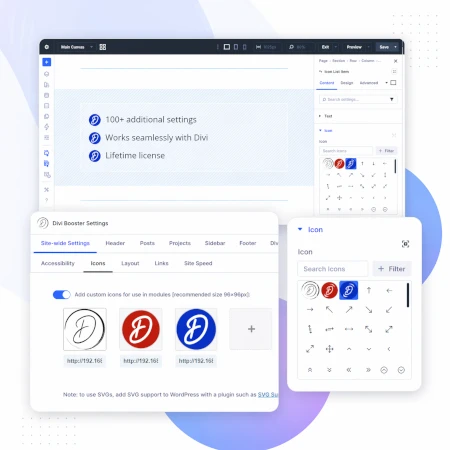
Upload your own custom icons
Use icons across multiple Divi modules

Blog & Content Enhancements
Improve how your blog content looks and works
List tags in your blog modules
Filter the blog module by author
Customize pagination text


Gallery & Media Control
Take full control of images and sliders
Customize sliders and navigation
Control image sizing and layout
Disable unwanted animations

Accordion & Counters
Make interactive elements more flexible
Start accordions open or closed
Let users fully collapse sections
Customize counter behavior and timing

Video Module Enhancements
Get more control over your video modules
Autoplay, mute, and loop videos
Hide player controls
Limit YouTube related videos
Contact Form Improvements
Make your forms more powerful and reliable
Send confirmation emails automatically
Block spam by email, domain, or keyword
Developer & Advanced Tools
Extra control when you need it
Built-in CSS manager
Optimize JS and CSS loading
Import and export settings
And Lots, Lots More…
Divi Booster comes packed with everything you need to build more powerful and awesome Divi sites in less time
Trusted by Divi Users Worldwide
"Divi Booster is a great product and we’ve never really needed support for it but, on the one occasion we needed advice, Dan was super helpful."
"This plugin does exactly what I needed it to do. I do not have any developer skills, but support was excellent and resolved all of the questions I had quickly."
"Divi Booster is fantastic. I used this plugin to improve the header area and footer area on a client's website. My client is very pleased."
Frequently Asked Questions
What is Divi Booster?
Divi Booster is a WordPress plugin that adds 100+ new features and customization options to the Divi theme. It lets you modify layouts, modules, headers, and more – without writing code.
Do I need coding knowledge to use Divi Booster?
No. Divi Booster is designed for non-developers as well as professionals. You simply install the plugin and enable the features you want – no CSS, PHP, or JavaScript required.
Does Divi Booster work with Divi 5?
Yes. Divi Booster is actively maintained and compatible with both Divi 4 and Divi 5, with regular updates to ensure ongoing compatibility.
Can I use Divi Booster on client websites?
Yes. You can use Divi Booster on client sites. The 3-site and unlimited licenses are especially popular with freelancers and agencies building multiple websites.
What kind of features does Divi Booster add?
Divi Booster adds a wide range of enhancements, including:
- Additional settings for Divi modules
- Header and navigation customization
- Blog and content improvements
- Layout and spacing controls
- Lots more icons
Overall, it gives you much more control over how Divi works – without needing custom code.
Will Divi Booster slow down my website?
No. Divi Booster is designed to be lightweight. You can enable only the features you need, so unnecessary code isn’t loaded. In some cases, it can even help improve performance by reducing the need for custom scripts.
How is Divi Booster different from other Divi plugins?
Divi Booster focuses on adding practical, real-world improvements to Divi – things users frequently need when building sites. Instead of being a niche add-on, it acts as an all-in-one toolkit to extend Divi’s core functionality.
How do I install Divi Booster?
After purchase, you download the plugin file and upload it via your WordPress dashboard (Plugins → Add New → Upload Plugin). Once activated, you can enable features directly within Divi.
Do you offer support and updates?
Yes. Divi Booster includes ongoing updates and support. The plugin has been maintained for over 10 years, with regular compatibility updates for new versions of WordPress and Divi.
Is there a refund policy?
Yes. If Divi Booster isn’t the right fit for your needs, you can request a refund within the specified refund period (90 days).
Can I enable or disable individual features?
Yes. Divi Booster is modular – you can turn features on or off individually, so you only use what you need for each site.
Where can I see the full feature list?
You can view the complete list of features here:
Hey Dan,
Obviously this is a must-have for the Divi designer! Is the $15 price for a license for a single site? I usually have a couple jobs going at once. Do I need to buy a license/download for each site?
Thanks for all of the hard work!
You're welcome, Eric! The $15 includes unlimited licenses, so you can use the same license on as many sites as you like (including client sites).
Hey Dan. This looks awesome. I have a question tho. For the slider feature, will the feature in this plugin allow the slider to be resized so it looks even, not cut off, and not warped on computers and phones with different screen sizes. This is the thing I need fixed the most because at the moment I'm using a boxed layout so the slider images aren't chopped at the bottom but I would love to use the full screen version.
Hi Josh, at the moment the plugin lets you set the slider height on desktop-sized screens, and adjusts the various components (background, slider image and text, etc) to look right with the new height. On mobiles it defaults to the standard Divi slider sizing.
The Divi slider seems to be a thorn in everyone's side and I plan to spend some time figuring out good solutions for all the slider-related issues people have been having. I'll update the plugin when I have more options for controlling the slider. This will hopefully include solutions to the issues you mention. The plugin probably won't solve all your slider woes at the moment, though it may improve things a bit.
Help! I can't find the email with the license key. Can you resend that or is there a way to find it?
I've just resent the email to you, Tea. Let me know if you don't receive it.
can i make a simple landing page like that with your plugin:
http://christianmickelsen.com/fsts/plc-1/
can i?
thnks man.
Hey Eric, not at the moment, I'm afraid. But it would be a good feature so I've added it to my list of future Divi Booster features and hopefully I'll be able to implement it for you at some stage. I'll let you know when I do. Cheers!
Wow. The ability to use divi's page builder inside the blog is worth the price of admission all by itself. Such a brilliant piece of code from one so young. I look forward to watching your career expand.
I am already setting up my affiliate link. Please tell me if it's too early for that.
OK, Dan. I came straight here after receiving your email and I've already made my purchase. I'll be installing and testing shortly, and I'm anxious to put Divi Booster through its paces. My one concern is what happens to the tweaks and changes I've made "the old-fashioned way" thanks to your suggestions here on the site? Does the plugin override them, append them, or…?
Hey Bill, the plugin won't overwrite your "old-fashioned changes" :) It just adds to what is already there. Of course if you've previously set the color on something, say, and then you set a new color on the same thing via the plugin, your change will be overwritten. But everything else should be unaffected by the plugin. Hope that makes sense!
Yeah, that makes sense, Dan, thanks. I've already implemented a number of great suggestions you've made here on the site, but I look forward to the simplicity and flexibility the plugin will give me to get more out of them (and avoid some of the missteps I had along the way due to user error). Sight unseen, great job! ;-)
Hi Dan,
Ok purchased !! I will test it and let you know if there is any feedback ;)
Thanks
Chris
Just purchased Divi Booster, but I can't find the download.
Have I missed something? Did I buy too quickly?
Just got my receipt with the download.
I was toooo excited!!
I'm definitely going to buy this plugin. I have a question though, as well as some feature requests. Question: will the plugin work with auto-updates? I hate having to upload a new file to update it.
Feature requests:
https://wordpress.org/support/topic/a-few-feature-requests-4 those items, plus Gravity Forms CSS (which that plugin does), and: ADD FONT AWESOME to blurb icons, and available to use in content areas. That instantly adds tons of vector icons to Divi, which would be excellent.
Hey Tevya, yes the plugin has auto updates enabled. You'll be able to install updates through the WordPress dashboard as you do for other plugins.
Thanks for the feature requests, I'll definitely try and get them into the plugin at some stage. I've had a lot of requests for font awesome, so it'll probably be one of the first things I tackle after the launch is wrapped up.
Oh and another one to add is a better way of managing blocks of media queries. I'm a noob when it comes to CSS but when I realised what it took (thanks to Geno) I was happy with the result but disappointed with the amount of effort.
Have yourself my kingdom too, in exchange for the addition of a user friendly interface for managing media.
Hey Paul, the plugin's CSS manager has a feature for selecting the screen widths that a particular bit of CSS is applied to. The screen widths you can choose from are the natural responsive breakpoints in Divi (e.g. "mobile", "tablets", etc). The plugin will automatically add the media query to the CSS so you don't have to. I want to improve this feature in the future, but hopefully it'll be of some use now.
Hi Dan,
These features look great! There's a lot here of what I've been asking ET to add.
I just want to second Steven's request:
"Spacing Spacing Spacing. The spacing/margin/padding between sections is dreadfully large. Lets have control over this."
I would pay double if this were a feature! This causes so many unnecessary extra CSS tweaks!
I will definitely be adding this one soon, Paul. Stay tuned!
I can't wait. Something the developers should have incorporated from the start. I would use it more but it requires more effort than I am willing to give. Thanks!