
Divi Booster
Customize Divi Without Code - Build Better Sites Faster
- Add powerful new Divi features instantly
- Customize headers, layouts, modules & mobile
- Save hours on every site build
Compatible with Divi 4 & 5
Compatible with Divi 4 & 5
WP 6.9+ Compatible
Why Divi Booster?
Saves You Time
Build your site faster with less effort:
- Fix common Divi issues in seconds
- Avoid hunting for code snippets
- Skip hours of CSS and troubleshooting
Less time fixing. More time building.
Packed with Features
Get the settings Divi is missing:
- Add 100+ new Divi settings
- Extend modules with powerful settings
- Control every part of your site
Everything you need in one plugin.
Easy to Use
Using Divi Booster is simple:
- Install the plugin
- Enable the features you want
- Instantly improve your site
No coding. No complexity.
"Divi Booster is a great product and we’ve never really needed support for it but, on the one occasion we needed advice, Dan was super helpful." – Will Nuttall, Absolute Media
Trusted by 33,000+ users on 75,000+ sites for over 10 years
See what you can do with Divi Booster
Add powerful new controls across Divi and its modules – without writing code.
Enhanced Divi Modules
Add powerful new controls to Divi’s built-in modules
Extend blog, gallery, video, and more
Add missing settings directly where you need them
Customize modules without CSS

Header & Navigation
Customize your Divi header in minutes – no code required
Rearrange header elements
Customize sticky header behavior
Improve dropdown menus and spacing


Social & Custom Icons
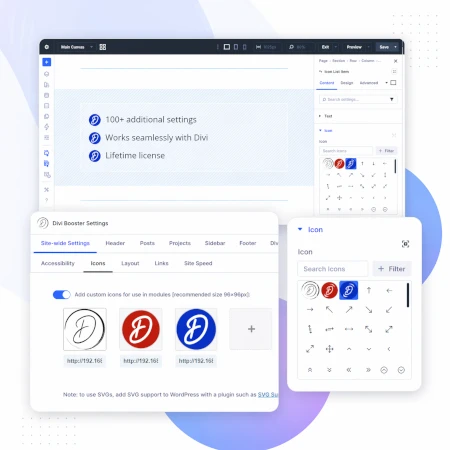
Add and customize icons across your site
250+ additional social icons
Upload your own custom icons
Use icons across multiple Divi modules

Blog & Content Enhancements
Improve how your blog content looks and works
List tags in your blog modules
Filter the blog module by author
Customize pagination text


Gallery & Media Control
Take full control of images and sliders
Customize sliders and navigation
Control image sizing and layout
Disable unwanted animations

Accordion & Counters
Make interactive elements more flexible
Start accordions open or closed
Let users fully collapse sections
Customize counter behavior and timing

Video Module Enhancements
Get more control over your video modules
Autoplay, mute, and loop videos
Hide player controls
Limit YouTube related videos
Contact Form Improvements
Make your forms more powerful and reliable
Send confirmation emails automatically
Block spam by email, domain, or keyword
Developer & Advanced Tools
Extra control when you need it
Built-in CSS manager
Optimize JS and CSS loading
Import and export settings
And Lots, Lots More…
Divi Booster comes packed with everything you need to build more powerful and awesome Divi sites in less time
Trusted by Divi Users Worldwide
"Divi Booster is a great product and we’ve never really needed support for it but, on the one occasion we needed advice, Dan was super helpful."
"This plugin does exactly what I needed it to do. I do not have any developer skills, but support was excellent and resolved all of the questions I had quickly."
"Divi Booster is fantastic. I used this plugin to improve the header area and footer area on a client's website. My client is very pleased."
Frequently Asked Questions
What is Divi Booster?
Divi Booster is a WordPress plugin that adds 100+ new features and customization options to the Divi theme. It lets you modify layouts, modules, headers, and more – without writing code.
Do I need coding knowledge to use Divi Booster?
No. Divi Booster is designed for non-developers as well as professionals. You simply install the plugin and enable the features you want – no CSS, PHP, or JavaScript required.
Does Divi Booster work with Divi 5?
Yes. Divi Booster is actively maintained and compatible with both Divi 4 and Divi 5, with regular updates to ensure ongoing compatibility.
Can I use Divi Booster on client websites?
Yes. You can use Divi Booster on client sites. The 3-site and unlimited licenses are especially popular with freelancers and agencies building multiple websites.
What kind of features does Divi Booster add?
Divi Booster adds a wide range of enhancements, including:
- Additional settings for Divi modules
- Header and navigation customization
- Blog and content improvements
- Layout and spacing controls
- Lots more icons
Overall, it gives you much more control over how Divi works – without needing custom code.
Will Divi Booster slow down my website?
No. Divi Booster is designed to be lightweight. You can enable only the features you need, so unnecessary code isn’t loaded. In some cases, it can even help improve performance by reducing the need for custom scripts.
How is Divi Booster different from other Divi plugins?
Divi Booster focuses on adding practical, real-world improvements to Divi – things users frequently need when building sites. Instead of being a niche add-on, it acts as an all-in-one toolkit to extend Divi’s core functionality.
How do I install Divi Booster?
After purchase, you download the plugin file and upload it via your WordPress dashboard (Plugins → Add New → Upload Plugin). Once activated, you can enable features directly within Divi.
Do you offer support and updates?
Yes. Divi Booster includes ongoing updates and support. The plugin has been maintained for over 10 years, with regular compatibility updates for new versions of WordPress and Divi.
Is there a refund policy?
Yes. If Divi Booster isn’t the right fit for your needs, you can request a refund within the specified refund period (90 days).
Can I enable or disable individual features?
Yes. Divi Booster is modular – you can turn features on or off individually, so you only use what you need for each site.
Where can I see the full feature list?
You can view the complete list of features here:
Hi Dan,
I purchased and installed DiviBooster for the codesnippet / PHP function, but when I go to the insert module I do not see the Code Snippet option — have I missed turning something on?
Hi Francis. The code snippet module is an entirely separate plugin from Divi Booster. I see you've purchased both Divi Booster and the Code Snippet module. If you haven't already, you can install the Code Snippet module by downloading its zip file from your account (or the email I've just sent you) and uploading that to WordPress. After that, you should see it in the Divi Builder when you go to add a module. I hope that helps, but let me know if you still aren't able to see it. Thanks!
I am currently developing my website. Will Divi Booster allow me to add additional social media icons like Instagram and Pinterest to the footer? Just wondering before I purchase. Thanks!
Hi Pat, yes, it will :)
Once installed, go to "Divi > Theme Customizer > Divi Booster > Social Icons" and you'll be able to choose from any of a 100+ social icons, which includes Instagram and Pinterest. Make sure you have Divi configured to show social icons in the footer by enabling the setting at "Divi > Theme Customizer > Footer > Footer Elements > Show Social Icons".
I hope that helps, but give me a shout if you have any questions, etc. Thanks!
Hey Dan
So I'm setting up an eLearning website and am shopping around for a better WP theme that is easily compatible with LearnDash – I have one currently but I'm not particularly happy with it (ugly/clunky, etc.). As an added complication, I've got a bunch of SCORM (Captivate) packages I want to include as part of this whole package – are there functions in the Divi Booster package that would help with this?
Thanks for your time
Hey Nick, as luck would have it I just released a new plugin a week or so ago that is specifically designed to make improve compatibility between LearnDash and the Divi theme:
https://divibooster.com/divi-learndash-kit/
It includes the ability to enable the Divi drag-and-drop page builder functionality on LearnDash pages (courses, lessons, etc), and adds a selection of Divi "modules" which make it easy to use LearnDash shortcodes within the drag-and-drop Divi Builder. It also handles a few style conflicts, etc, behind the scenes to ensure things look correct.
I don't have anything in there to help with your SCORM problem. I'm not familiar with the process, but I believe that LearnDash supports Tin Can API / xAPI and that there are ways to convert SCORM packages to xAPI. That would (I think) get them into LearnDash, at which point you could choose which (if any) of the imported pages you want to enable the Divi Builder on to let you easily edit their layouts.
If you do decide to give the plugin a try, I'll be more than happy to try and accommodate any suggestions you have for improvements / refund you if you decide it or Divi isn't for you. Thanks!
hi dan,
hope all is well. I have installed divi on a new site, updated plugins but changes made in the booster are not reflecting. Tried everything, uninstall and re-install, clear cache, safari vs chrome, etc etc… no changes working.
any ideas.
Hi Jason, the reason the changes aren't showing up is that the Divi Booster CSS / JS files are returning a 404 not found error.
When I've seen this happen in the past, it has been due to an incorrect value of the WordPress upload_path (which can happen, for example, when a site is cloned).
Can I get you to try the tip in this post, and let me know if that doesn't solve it for you:
https://divibooster.com/fixing-404-not-found-error-on-divi-booster-files/
Thanks!
I have to disable Booster because the logos doesn't show any longer.
Using Divi 3.0.90. and .91 on these sites.
Seems I had some plugin conflicts on these sites. Fixed them now. Only my own site can't use DB any longer.
Hey Johan, sorry to hear you've been having problems. It there any chance you can send me a link to a page on your site which shows the header / logo? I took a look at the site linked in your comment, but not sure if that's the right site – none of the pages I saw were displaying the header. I'm sure we'll be able to figure out what's going / get it sorted. Thanks!
Hi, not sure if you can help.
Hi, I just bought your plugin. People say it will make development easier. I am trying to work out why I have this extra white space at the bottom of my header image at http://propertygroupbuying.net.au and also such big margins or padding in the sections, when everything says 0 in the divi builder. Can you please help me to know how I can fix this or where I can watch a video that might explain what I need to do?
Thanks. Michael
Hey Michael, for the header image, are you talking about the fullwidth slider with the picture of Surfer's Paradise with the "Property Buying Group" logo? The bulk of the padding below the logo / Join Now button is coming from the bottom padding set on the slide description. If you go into the Fullwidth Slider Settings and click on the slide to get into the Slide Settings. From there, go to the "Design" tab and scroll down to the "Custom Padding" setting. Set the bottom padding to 0. Also, go to the "Advanced" tab and go to the "Slide Description" box and make sure there is no "padding-bottom" value there. Save and hopefully the padding should now be gone. You may then want to add a bit of bottom padding back in to get something that looks right.
Are you able to point me to an example (or two) of particular sections with excess margins / padding so that I can make sure I'm looking at the right thing / give you the right advice? Cheers!
Hello Dan, Divi Booster is slowing down my site totally, why could this be happening?
Hi David, thanks for getting in touch and I'm sorry to hear you're having this issue. I'm not aware of anything that could be causing this. Is there any chance you'd be able to give me access to the site so that I can take a look and see if I can figure out what's going on? If you're happy to do so, please can you send me login details via the contact form:
https://divibooster.com/contact-form/
Thanks!
Hi Dan,
I still install my old DiviBooster version and then update. Purchase receipt was 28 apr 2015 13:36:04 CEST. It's not listed in my "completed purchases". I guess it's too old. Can I download a more recent copy? I don't think I ever received a link for that. Thanks in advance!
Hey Anton, I've just resent your purchase confirmation email – it'll go to the email address you originally purchased with, which is different to the one you supplied in the comment. I've also sent you an email at the email address you're currently using in your comment with the details. Let me know if you have any questions, etc. Thanks!
Hi Dan,
I need to install DiviBooster on a new Divi 3.x site today. When I login to my account I see the info pasted at the bottom of this post.
Does the current DiviBooster download provide the most current DiviBooster (that's compatible with the most current Divi Theme v3.x? If not, can you please send me a download link ASAP. Thanks.
Also, are all of the products I purchased compatible with Divi Theme and Divi Builder (latest versions)? Thanks.
Divi Booster Plugin Divi Booster
Divi Dashboard Welcome Divi-Dashboard-Welcome-Download-Package
Aspen Footer Editor Aspen Footer Editor
Divi Switch diviswitch21
Divi Ghoster divi-ghoster-kit-2-1-0
Hi Peter, yes the current download will give you the latest version of Divi Booster. I've just resent your purchase confirmation email which contains a copy of the download link should you need it.
The latest version of Divi Booster is compatible with the latest version of Divi.
You hopefully received an email a while ago about the migration of the other bundle plugins you mention to Divi Space. Due to changes to the automatic updates of some of the plugins, the latest versions are now only available from Divi Space. The versions accessible in your account on my site should still work without any major problems on Divi / Divi Builder, but Divi Space are in the process of setting up accounts / access to the latest versions of the plugin for everyone who purchased the bundle through my site. They haven't completed this yet, but have said they are happy to manually do the set up for anyone who contacts them directly at Divi Space. Just let them know you purchased the bundle from me and they should be able to fast track setting up your account and giving you access to the latest versions.
I hope that makes sense, but let me know if anything is unclear. Thanks!
Hi I cannot find my correspondence for divi booster, but an old zip was dated 10/03/15. Its an old version and when I unzip it doesnt have a setting tab.
I first bought it to build the stratagemIIS website.
You will have my name record from the purchase
Hi John, I was able to track down your purchase and have resent your purchase confirmation email, which contains the download link for the latest version. Let me know if you don't receive it. Thanks!
Where do we go to get support for the plugin?
Hi Aleisha, send me a message via the contact form and I'll do my best to help you out:
https://divibooster.com/contact-form/
I just bought Divi booster tonight. I activated it on my new Divi site and the entire site went white, just blanked it out. I deactivated and deleted the plugin, thinking something was wrong with my download. I looked for the link to re-download the plugin and can't find it anywhere. Can you please resend the download link so I can try again?
My Paypal receipt says "Leitworks Art" on it if that helps you find it.
Hi Shelly, thanks for that. I've just resent your purchase confirmation email so hopefully you should receive it shortly.
The site going white sounds to me like Wordpress is reaching its memory limit. This post explains how to increase it:
https://docs.woocommerce.com/document/increasing-the-wordpress-memory-limit/
Let me know if the email doesn't come through, or if you are still having issues after increasing the memory. Thanks!