
Divi Booster
Customize Divi Without Code - Build Better Sites Faster
- Add powerful new Divi features instantly
- Customize headers, layouts, modules & mobile
- Save hours on every site build
Compatible with Divi 4 & 5
Compatible with Divi 4 & 5
WP 6.9+ Compatible
Why Divi Booster?
Saves You Time
Build your site faster with less effort:
- Fix common Divi issues in seconds
- Avoid hunting for code snippets
- Skip hours of CSS and troubleshooting
Less time fixing. More time building.
Packed with Features
Get the settings Divi is missing:
- Add 100+ new Divi settings
- Extend modules with powerful settings
- Control every part of your site
Everything you need in one plugin.
Easy to Use
Using Divi Booster is simple:
- Install the plugin
- Enable the features you want
- Instantly improve your site
No coding. No complexity.
"Divi Booster is a great product and we’ve never really needed support for it but, on the one occasion we needed advice, Dan was super helpful." – Will Nuttall, Absolute Media
Trusted by 33,000+ users on 75,000+ sites for over 10 years
See what you can do with Divi Booster
Add powerful new controls across Divi and its modules – without writing code.
Enhanced Divi Modules
Add powerful new controls to Divi’s built-in modules
Extend blog, gallery, video, and more
Add missing settings directly where you need them
Customize modules without CSS

Header & Navigation
Customize your Divi header in minutes – no code required
Rearrange header elements
Customize sticky header behavior
Improve dropdown menus and spacing


Social & Custom Icons
Add and customize icons across your site
250+ additional social icons
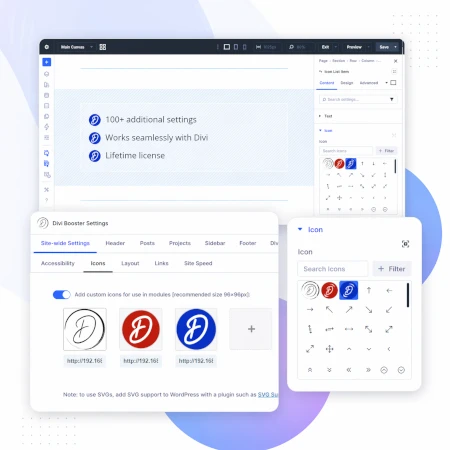
Upload your own custom icons
Use icons across multiple Divi modules

Blog & Content Enhancements
Improve how your blog content looks and works
List tags in your blog modules
Filter the blog module by author
Customize pagination text


Gallery & Media Control
Take full control of images and sliders
Customize sliders and navigation
Control image sizing and layout
Disable unwanted animations

Accordion & Counters
Make interactive elements more flexible
Start accordions open or closed
Let users fully collapse sections
Customize counter behavior and timing

Video Module Enhancements
Get more control over your video modules
Autoplay, mute, and loop videos
Hide player controls
Limit YouTube related videos
Contact Form Improvements
Make your forms more powerful and reliable
Send confirmation emails automatically
Block spam by email, domain, or keyword
Developer & Advanced Tools
Extra control when you need it
Built-in CSS manager
Optimize JS and CSS loading
Import and export settings
And Lots, Lots More…
Divi Booster comes packed with everything you need to build more powerful and awesome Divi sites in less time
Trusted by Divi Users Worldwide
"Divi Booster is a great product and we’ve never really needed support for it but, on the one occasion we needed advice, Dan was super helpful."
"This plugin does exactly what I needed it to do. I do not have any developer skills, but support was excellent and resolved all of the questions I had quickly."
"Divi Booster is fantastic. I used this plugin to improve the header area and footer area on a client's website. My client is very pleased."
Frequently Asked Questions
What is Divi Booster?
Divi Booster is a WordPress plugin that adds 100+ new features and customization options to the Divi theme. It lets you modify layouts, modules, headers, and more – without writing code.
Do I need coding knowledge to use Divi Booster?
No. Divi Booster is designed for non-developers as well as professionals. You simply install the plugin and enable the features you want – no CSS, PHP, or JavaScript required.
Does Divi Booster work with Divi 5?
Yes. Divi Booster is actively maintained and compatible with both Divi 4 and Divi 5, with regular updates to ensure ongoing compatibility.
Can I use Divi Booster on client websites?
Yes. You can use Divi Booster on client sites. The 3-site and unlimited licenses are especially popular with freelancers and agencies building multiple websites.
What kind of features does Divi Booster add?
Divi Booster adds a wide range of enhancements, including:
- Additional settings for Divi modules
- Header and navigation customization
- Blog and content improvements
- Layout and spacing controls
- Lots more icons
Overall, it gives you much more control over how Divi works – without needing custom code.
Will Divi Booster slow down my website?
No. Divi Booster is designed to be lightweight. You can enable only the features you need, so unnecessary code isn’t loaded. In some cases, it can even help improve performance by reducing the need for custom scripts.
How is Divi Booster different from other Divi plugins?
Divi Booster focuses on adding practical, real-world improvements to Divi – things users frequently need when building sites. Instead of being a niche add-on, it acts as an all-in-one toolkit to extend Divi’s core functionality.
How do I install Divi Booster?
After purchase, you download the plugin file and upload it via your WordPress dashboard (Plugins → Add New → Upload Plugin). Once activated, you can enable features directly within Divi.
Do you offer support and updates?
Yes. Divi Booster includes ongoing updates and support. The plugin has been maintained for over 10 years, with regular compatibility updates for new versions of WordPress and Divi.
Is there a refund policy?
Yes. If Divi Booster isn’t the right fit for your needs, you can request a refund within the specified refund period (90 days).
Can I enable or disable individual features?
Yes. Divi Booster is modular – you can turn features on or off individually, so you only use what you need for each site.
Where can I see the full feature list?
You can view the complete list of features here:
Hi Dan,
I saw the msg from Janet. I did get the same warning from divi booster having Wordfence on my site. Also, my screen was blank (on two websites) and when I added error reporting to true, I saw divi booster was the issue. After having deleted divi booster and reinstalled, everything is running fine now also after the update to the latest version again. Cheers Christa
Hi Christa, I'm glad everything is sorted, and sorry for the hassle.
I'm guessing the blank screen issue was a result of following Wordfence's (ill-informed) recommendation. Wordfence's recommendation to delete a single file from Divi Booster (or any other plugin) is a bad recommendation as it can break the plugin and hence the site, resulting in a blank screen. In this instance, following Wordfence's advice is significantly worse than ignoring it. For the benefit of anyone else reading this, the best course of action is to ignore Wordfence's recommendation to delete the file and to simply apply the Divi Booster update instead.
Dan … it appears I updated the plugin and THEN deleted the file that Wordfence suggested contained malware (not knowing your update was a fix). How do I fix the plugin now as it is the current 2.7.6 but it is broken due to the missing file?
Hi Michael, the best thing to do would be to fully delete the plugin from your site, by deleting the "divi-booster" folder from "wp-contents/plugins" within your WordPress install (e.g. by using FTP or your web host's file manager functionality). Then install a fresh copy of Divi Booster 2.7.6, which you can download from your account on my site or your original purchase email. The plugin will pick up all your settings and should have you back up and running again. I hope that helps!
Hey Dan – I've been getting warnings that there is suspect code in the Divi Booster file called Fixes. Has this come across your desk yet?
Hi Janet, Wordfence has been giving some warnings. They are nothing to worry about and you can get rid of them by updating to the latest version of Divi Booster. This post has more details:
https://divibooster.com/wordfence-warnings-with-divi-booster-nothing-to-worry-about/
Let me know if that doesn’t solve it for you. Thanks!
Hi. Getting Wordfence critical warnings about Mobile_Detect.php in core/fixes/011-custom-css-media-queries/Mobile-Detect-2.8.11. Deleting the file breaks the site. Please advise. Thanks.
Hi Andrew, despite how alarming this seems, there is nothing to worry about. Divi Booster includes a third-party library for detecting which browser is in use (as part of its CSS Manager feature). There is no issue with the code of either Divi Booster or this third-party library. Rather, the source code of the third-party library includes comments with a link to the manufacturer of each device it is capable of detecting. It seems that the website of one of the tablet manufacturers linked to by the library is being flagged by Google (and hence WordFence) as having malware.
There is essentially no risk to Divi Booster users from this. The only way to be affected by this would be to have manually been browsing the source code of Divi Booster and then to go into the code for the third-party library and click on the link to this particular tablet manufacturer (Vonino). As long as you have not done that, your site will not have been affected in any way. I have just released Divi Booster 2.7.6 which removes the offending link.
I hope that helps (and puts your mind at ease). Please feel free to let me know if you have any questions, etc. Thanks!
Thanks for sorting it out so quickly. WordFence filed that as Malware and that gave me a slight heart attack. :)
Glad to know that everything is just fine after the update.
You're very welcome, Kate :) Yes, Wordfence was a bit alarmist with this one. There was never any problem with the plugin itself – it just happened to link to a tablet manufacturer's site (and only in a comment) that seems to be having some issues.
Hi Dan, Thanks for the details. I also had a client upset with me about this but I think the way you explained it is awesome and I appreciate your willingness to provide an awesome plugin. I was able to use your explanation to ease my client's worries and simply updated the plugin and we are good to go.
I had the same issue this morning and deleted the file that Wordfence suggested was infected. My pages went blank. I had to deactivate Divi Booster and reformat some pages. Can you update the plugin so I can reactivate the missing file?
Hi Michael, just replied to your follow up comment, but for anyone else looking for this, version 2.7.6 fixes the issue. Thanks!
Came to ask the same question. Looks like you sorted it out in the new update. Thank you!
Following- I’m getting this malware warning when I updated my Booster plugin as well.
Hi Sheila, sorry you're getting these warnings. Hopefully you've seen my reply to Andrew already. I've also put up this post about it:
https://divibooster.com/wordfence-warnings-with-divi-booster-nothing-to-worry-about/
Thanks!
Hello,
Is DIVI BOOSTER compatible with the latest version of DIVI?
Thank you
Antonello
Hi Antonello, yes it is. I am always developing Divi Booster and testing it against the latest version of Divi. Of course, if you do notice that a particular feature isn't working, please let me know and I'll do my best to fix it. Thanks!
Dan – According to the Booster Changelog, it's been tested up to WP 4.9.5. However, the current version of WP is 4.9.8, and is therefore not compatible with the latest version. When are you going to test it up to the current version?
I've just run into a major problem with the Booster breaking my site because it somehow contracted some malware and it broke my site, so I've had to disable it. I love the plugin (when it's functioning properly) and I'd hate to have to remove it entirely, but until it's completely up to date I'm reluctant to use it.
Hi Anastasia, despite how alarming this seems, there is nothing to worry about. Divi Booster includes a third-party library for detecting which browser is in use (as part of its CSS Manager feature). There is no issue with the code of either Divi Booster or this third-party library. Rather, the source code of the third-party library includes comments with a link to the manufacturer of each device it is capable of detecting. It seems that the website of one of the tablet manufacturers linked to by the library is being flagged by Google (and hence WordFence) as having malware.
There is essentially no risk to Divi Booster users from this. The only way to be affected by this would be to have manually been browsing the source code of Divi Booster and then to go into the code for the third-party library and click on the link to this particular tablet manufacturer (Vonino). As long as you have not done that, your site will not have been affected in any way. I have just released Divi Booster 2.7.6 which removes the offending link.
Divi Booster 2.7.6 has been tested with WP 4.9.8 – I've updated the changelog to reflect this.
I hope that helps (and puts your mind at ease). Please feel free to let me know if you have any questions, etc. Thanks!
Can your plugin enable me to have the site identity and tagline set in the Customize Theme area show instead of the logo?
Thrivethemes had that as a feature and I really liked it.
Hi Karryn, yes it can :) Here's a post describing the feature:
Display Site Title and Tagline Text in Header
I hope that helps, but let me know if you have any questions about it, etc.
Can your plugin enable me to have the Site Identity and tagline show up in the top navigation bar on the left instead of the logo?
Hi Karryn, yes it can :) Here's a post describing the feature:
Display Site Title and Tagline Text in Header
I hope that helps, but let me know if you have any questions about it, etc.
Hey Dan!
I just purchased the plugin but my colleague already got it. Is it possible to get a refund as advertised?
Hey Axel, sure thing. I've just put through a refund (and have sent you an email confirming this). Thanks!
Hey Dan!
Just purchased it but it turns out my colleague already got it for our website. Is it possible for a refund?
Hey Axel, I've issued the refund and emailed you. Let me know if you have any questions, etc. Thanks!
I solved the issue by reinstalling divi booster.
So you can forget about this mail
Great, I’m glad that fixed it, and thanks for letting me know, Oliver.
Hi, Dan,
I'm having the exact same issue as Oliver — no Customizer options except for Widgets. If I deactivate Divi Booster, the customizer functions as expected. Unfortunately, reinstalling the Div Booster doesn't seem to resolve the issue for me. Any ideas?
Hey Rob, sorry to hear this. I'm not sure what would be causing that behavior for you guys – is there any chance I'd be able to login and take a look at what's going wrong? If so, I've just sent you an email that you can reply to with login details. Thanks!
Hello Dan,
I have the latest divi Version and the latest divi Booster (2.7.4) installed.
When I look into the Theme Customizer, the menu holds only one column (Widgets). Whenn I disable Divi Booster, everthing is fine…
Can you please advice
Hi There
I have tried to purchase but says I need to login first to purchase.
Best Wishes
Hi Martin, thanks for letting me know about this. It turns out this was due to a bug in Easy Digital Downloads (the plugin I use for the checkout functionality). They've released an update which I've applied, and it looks like this problem has been resolved. Please let me know if you encounter any further issues with it. Cheers, Dan.