
Divi Booster
Customize Divi Without Code - Build Better Sites Faster
- Add powerful new Divi features instantly
- Customize headers, layouts, modules & mobile
- Save hours on every site build
Compatible with Divi 4 & 5
Compatible with Divi 4 & 5
WP 6.9+ Compatible
Why Divi Booster?
Saves You Time
Build your site faster with less effort:
- Fix common Divi issues in seconds
- Avoid hunting for code snippets
- Skip hours of CSS and troubleshooting
Less time fixing. More time building.
Packed with Features
Get the settings Divi is missing:
- Add 100+ new Divi settings
- Extend modules with powerful settings
- Control every part of your site
Everything you need in one plugin.
Easy to Use
Using Divi Booster is simple:
- Install the plugin
- Enable the features you want
- Instantly improve your site
No coding. No complexity.
"Divi Booster is a great product and we’ve never really needed support for it but, on the one occasion we needed advice, Dan was super helpful." – Will Nuttall, Absolute Media
Trusted by 33,000+ users on 75,000+ sites for over 10 years
See what you can do with Divi Booster
Add powerful new controls across Divi and its modules – without writing code.
Enhanced Divi Modules
Add powerful new controls to Divi’s built-in modules
Extend blog, gallery, video, and more
Add missing settings directly where you need them
Customize modules without CSS

Header & Navigation
Customize your Divi header in minutes – no code required
Rearrange header elements
Customize sticky header behavior
Improve dropdown menus and spacing


Social & Custom Icons
Add and customize icons across your site
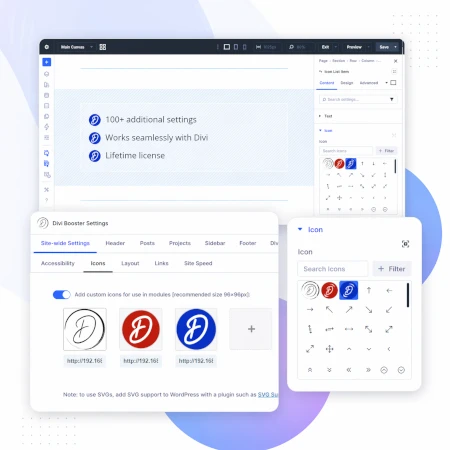
250+ additional social icons
Upload your own custom icons
Use icons across multiple Divi modules

Blog & Content Enhancements
Improve how your blog content looks and works
List tags in your blog modules
Filter the blog module by author
Customize pagination text


Gallery & Media Control
Take full control of images and sliders
Customize sliders and navigation
Control image sizing and layout
Disable unwanted animations

Accordion & Counters
Make interactive elements more flexible
Start accordions open or closed
Let users fully collapse sections
Customize counter behavior and timing

Video Module Enhancements
Get more control over your video modules
Autoplay, mute, and loop videos
Hide player controls
Limit YouTube related videos
Contact Form Improvements
Make your forms more powerful and reliable
Send confirmation emails automatically
Block spam by email, domain, or keyword
Developer & Advanced Tools
Extra control when you need it
Built-in CSS manager
Optimize JS and CSS loading
Import and export settings
And Lots, Lots More…
Divi Booster comes packed with everything you need to build more powerful and awesome Divi sites in less time
Trusted by Divi Users Worldwide
"Divi Booster is a great product and we’ve never really needed support for it but, on the one occasion we needed advice, Dan was super helpful."
"This plugin does exactly what I needed it to do. I do not have any developer skills, but support was excellent and resolved all of the questions I had quickly."
"Divi Booster is fantastic. I used this plugin to improve the header area and footer area on a client's website. My client is very pleased."
Frequently Asked Questions
What is Divi Booster?
Divi Booster is a WordPress plugin that adds 100+ new features and customization options to the Divi theme. It lets you modify layouts, modules, headers, and more – without writing code.
Do I need coding knowledge to use Divi Booster?
No. Divi Booster is designed for non-developers as well as professionals. You simply install the plugin and enable the features you want – no CSS, PHP, or JavaScript required.
Does Divi Booster work with Divi 5?
Yes. Divi Booster is actively maintained and compatible with both Divi 4 and Divi 5, with regular updates to ensure ongoing compatibility.
Can I use Divi Booster on client websites?
Yes. You can use Divi Booster on client sites. The 3-site and unlimited licenses are especially popular with freelancers and agencies building multiple websites.
What kind of features does Divi Booster add?
Divi Booster adds a wide range of enhancements, including:
- Additional settings for Divi modules
- Header and navigation customization
- Blog and content improvements
- Layout and spacing controls
- Lots more icons
Overall, it gives you much more control over how Divi works – without needing custom code.
Will Divi Booster slow down my website?
No. Divi Booster is designed to be lightweight. You can enable only the features you need, so unnecessary code isn’t loaded. In some cases, it can even help improve performance by reducing the need for custom scripts.
How is Divi Booster different from other Divi plugins?
Divi Booster focuses on adding practical, real-world improvements to Divi – things users frequently need when building sites. Instead of being a niche add-on, it acts as an all-in-one toolkit to extend Divi’s core functionality.
How do I install Divi Booster?
After purchase, you download the plugin file and upload it via your WordPress dashboard (Plugins → Add New → Upload Plugin). Once activated, you can enable features directly within Divi.
Do you offer support and updates?
Yes. Divi Booster includes ongoing updates and support. The plugin has been maintained for over 10 years, with regular compatibility updates for new versions of WordPress and Divi.
Is there a refund policy?
Yes. If Divi Booster isn’t the right fit for your needs, you can request a refund within the specified refund period (90 days).
Can I enable or disable individual features?
Yes. Divi Booster is modular – you can turn features on or off individually, so you only use what you need for each site.
Where can I see the full feature list?
You can view the complete list of features here:
Just learning about Divi and this was super informative! Thank you
Hi Dan,
I've been using your amazing plugin for many years now, and I'm very happy with it. As for the license, I believe that's unlimited, right? I hope so – but I'm experiencing a problem with the latest website I'm building for a client, where my license key seems not to be accepted anymore – if I try to input it in the settings page and then I click the "activate license" button, I get an error message such as "the link you click has expired, try again". Any feedback on what's happening? Thanks!
Hey Massimo, that's right, the license is unlimited. Can I suggest downloading / installing the latest version of Divi Booster from your account on my site (message me via the contact form if you need any help accessing it)? License keys are no longer needed in recent versions of the plugin, so you should avoid the error altogether (and benefit from the latest updates).
The error you're seeing relates to the WordPress "nonce" token being invalid. I'm not sure exactly what would be causing this, but if you do need to stick with the old version of Divi Booster you're currently using would you'd be willing to let me log into the site and take a look at what's going on? Thanks!
Hi again Dan, thanks for the prompt reply. I have tried to re-download the plugin by accessing it via the original email receipt with the licensing key – but by clicking the download link I get also an error message "Sorry but your download link has expired." from the wpthemefaqs site. I will forward to you the email so we can exchange more info and the log in info there. Thanks!
You're welcome, Massimo. I've just resent your purchase confirmation email, which should contain a new download link. You can also view your purchase history / download link by registering for an account using your current email address – i.e. the same one you originally purchased with. Accounts are automatically created now but weren't at the time of your purchase, hence the need to register for one manually. Hope that helps!
You rock'n'roll, man… thanks!
you're very welcome, Massimo!
Hi Dan,
Thanks for offering a simple fix to a complex problem! After struggling to make invisible buttons that were responsive and fix slide height issues I'm so glad I found your product! Took 30 seconds to make everything work and look great!
You rock my friend!
Great! I'm really glad the plugin helped you out. Thanks for letting me know, Nick! :)
Thanks for this great post related to this plugin.
Hi Dan!
Social icon added with Divi Booster are not right! I've added Facebook, Instagram and Youtube but instead I got a square with arrow, a circle with line and a circle with a x!
No incompatibility, just divi e divi booster installed!
Can you help?
Thanks
Hey Luca! It looks like the plugin was setting the style for these icons within the main Divi Booster CSS file. This file isn't created until the first save of the Divi Booster settings, which meant that if you added the social icons via the customizer before saving the main Divi Booster settings, the icons would be displayed incorrectly, as you've been seeing.
The next version of Divi Booster (2.8.3) will fix this. In the meantime, you should be able to work around the issue by going to the Divi Booster settings page (found at "Divi > Divi Booster" from the WP Dashboard menu) and clicking "Save Changes".
Hope that helps!
FYI: I've just released 2.8.3. Thanks!
Hi,
Latest Divi Booster update (Versioon 2.8.0) killed my wp-multisite installation (subdomain). In both occasion: Network activated or per site activated cases. If plugin was activated site goes blank, only some divi short codes…
Any ideas …?
Hi Sven, I'm very sorry you've had this problem. The 2.8.0 update of Divi Booster (released yesterday) contained a bug which causes some sites to crash. I've just released an update to Divi Booster (2.8.1) to address this. Upgrading to this version should resolve the error and restore the site. If you are unable to access the WP dashboard / plugins page, please delete the Divi Booster plugin folder (located in your WordPress installation folder at /wp-content/plugins/divi-booster) via your webhosts file manager functionality or via FTP. This should restore access to your WP dashboard. Please then download the latest version of Divi Booster from your Divi Booster account and install it via the plugins page. It should function correctly, and will pick up your existing Divi Booster settings. Please let me know if you have any further problems with it. Thanks, Dan.
Thanks Dan for fast reaction. Worked perfectly. Support -> Like ;)
You’re very welcome, Sven. Thanks :)
The 2.8.0 Update causes Critical 500 Errors and any site running PeepSo.
I had to go in via sFTP and delete the plugin, clear the CDN and then I could get the sites back up. I tried a fresh install, and it crashed again. I deactivated PeepSo and it ran fine, as soon as PeepSo was activated, crash.
I have been running PeepSo & Divi Booster for nearly a year w/o issues until today. I rolled back the Divi Booster to 2.7.9 and all is good, just can't update.
Chris Sgaragkino, CTO
ILGM, Inc.
2019-02-13T16:14:00+00:00 CRITICAL Uncaught Error: Call to undefined function et_get_option() in /fordoutfitter/wp-content/plugins/divi-booster/core/fixes/141-add-main-menu-separators/functions.php:7
Stack trace:
#0 /wordpress/core/5.0.3/wp-includes/class-wp-hook.php(286): db141_user_css(Object(wtfplugin_1_0))
#1 /wordpress/core/5.0.3/wp-includes/class-wp-hook.php(310): WP_Hook->apply_filters(NULL, Array)
#2 /wordpress/core/5.0.3/wp-includes/plugin.php(453): WP_Hook->do_action(Array)
#3 /fordoutfitter/wp-content/plugins/divi-booster/core/wtfplugin_1_0.class.php(183): do_action('wp_head.css', Object(wtfplugin_1_0))
#4 /wordpress/core/5.0.3/wp-includes/class-wp-hook.php(288): wtfplugin_1_0->compile_patch_files(Object(wtfplugin_1_0))
#5 /wordpress/core/5.0.3/wp-includes/class-wp-hook.php(310): WP_Hook->apply_filters(NULL, Array)
#6 /wordpress/core/5.0.3/wp-includes/plugin.php(453): WP_Hook->do_action(Array)
#7 /fordoutfitter/wp-content/plugins/divi-booster/core/update_patches.php(12): do_action('booster_update', Object(wtfplugin_1_0), '2.7.9', '2.8.0')
#8 /wordpress/core/5.0.3/wp-includes/class-wp-hook.php(286): booster_update_check(")
#9 /wordpress/core/5.0.3/wp-includes/class-wp-hook.php(310): WP_Hook->apply_filters(NULL, Array)
#10 /wordpress/core/5.0.3/wp-includes/plugin.php(453): WP_Hook->do_action(Array)
#11 /wordpress/core/5.0.3/wp-settings.php(344): do_action('plugins_loaded')
#12 /fordoutfitter/wp-config.php(86): require_once('/wordpress/core…')
#13 /wordpress/core/5.0.3/wp-load.php(42): require_once('/fordoutfitter/…')
#14 /wordpress/core/5.0.3/wp-blog-header.php(13): require_once('/wordpress/core…')
#15 /wordpress/core/5.0.3/index.php(17): require('/wordpress/core…')
#16 {main}
thrown in /fordoutfitter/wp-content/plugins/divi-booster/core/fixes/141-add-main-menu-separators/functions.php on line 7
Hi Chris, I'm very sorry you've had this problem. The 2.8.0 update of Divi Booster (released yesterday) contained a bug which causes some sites to crash. I've just released an update to Divi Booster (2.8.1) to address this. Upgrading to this version should resolve the error and restore the site. If you are unable to access the WP dashboard / plugins page, please delete the Divi Booster plugin folder (located in your WordPress installation folder at /wp-content/plugins/divi-booster) via your webhosts file manager functionality or via FTP. This should restore access to your WP dashboard. Please then download the latest version of Divi Booster from your Divi Booster account and install it via the plugins page. It should function correctly, and will pick up your existing Divi Booster settings. Please let me know if you have any further problems with it.
I'm not sure how PeepSo relates to this, but I'll look into that next. I think the update should fix the issue regardless of whether or not PeepSo is running.
Thanks, Dan.
Hello Dan, love your plugin!
Have a problem on http://www.runforjoyce.nl after updating to the latest version. It made de website unreachable. Only some code with the media query. After disabling the plugin by renaming the folder with FTP the website was reachable. I have Divi 3.19.12 installed. What to do?
Hi Herman, I'm very sorry you've had this problem. The 2.8.0 update of Divi Booster (released yesterday) contained a bug which causes some sites to crash. I've just released an update to Divi Booster (2.8.1) to address this. Upgrading to this version should resolve the error and restore the site. If you are unable to access the WP dashboard / plugins page, please delete the Divi Booster plugin folder (located in your WordPress installation folder at /wp-content/plugins/divi-booster) via your webhosts file manager functionality or via FTP. This should restore access to your WP dashboard. Please then download the latest version of Divi Booster from your Divi Booster account and install it via the plugins page. It should function correctly, and will pick up your existing Divi Booster settings. Please let me know if you have any further problems with it. Thanks, Dan.
Hi Dan: The current version of Divi Booster does not work with my 4.9 Divi Website. Is it possible to get back versions of divi? All was working great before I updated.
Hi Nancy, I'm very sorry you've had this problem. The 2.8.0 update of Divi Booster (released yesterday) contained a bug which causes some sites to crash. I've just released an update to Divi Booster (2.8.1) to address this. Upgrading to this version should resolve the error and restore the site. If you are unable to access the WP dashboard / plugins page, please delete the Divi Booster plugin folder (located in your WordPress installation folder at /wp-content/plugins/divi-booster) via your webhosts file manager functionality or via FTP. This should restore access to your WP dashboard. Please then download the latest version of Divi Booster from your Divi Booster account and install it via the plugins page. It should function correctly, and will pick up your existing Divi Booster settings. Please let me know if you have any further problems with it. Thanks, Dan.
Hi Dan,
I have came across issues since mid Nov 2018 and have emailed you about it. I have yet to get a response ever since. There seems to be no updates to the plugin for quite some time.
Right now one of my client's website, which is currently using DIVI Booster, is having a fatal error that caused the whole website to crash:
Uncaught Error: Call to undefined function et_get_option() in /home/thecatpe/public_html/wp-content/plugins/divi-booster/core/fixes/141-add-main-menu-separators/functions.php:7
I have since removed your plugin to get things working again.
Will you be replying to my email dated 15 Nov and Nov 29? And will there be new updates to the plugin to fix things, especially now that Wordpress 5.0 is out?
Your response will be appreciated.
Hi Armen, I'm very sorry you've had this problem. The 2.8.0 update of Divi Booster (released yesterday) contained a bug which causes some sites to crash. I've just released an update to Divi Booster (2.8.1) to address this. Upgrading to this version should resolve the error and restore the site. If you are unable to access the WP dashboard / plugins page, please delete the Divi Booster plugin folder (located in your WordPress installation folder at /wp-content/plugins/divi-booster) via your webhosts file manager functionality or via FTP. This should restore access to your WP dashboard. Please then download the latest version of Divi Booster from your Divi Booster account and install it via the plugins page. It should function correctly, and will pick up your existing Divi Booster settings. Please let me know if you have any further problems with it.
My sincere apologies for not having responded to your earlier emails. The past few months have been very busy and unfortunately haven't been able to get back to everyone who has contacted me. I'm working through the backlog now and will look into and reply to you about the issue you were having with the portfolio as soon possible.
Thanks, and my apologies again. Dan.
I started building my WordPress website enhansum.com using Elegant Theme's Divi Builder in early January 2019. Soon after I came to know of Divi Booster – a WordPress plug-in that extends the capabilities of Divi Builder. After purchasing it at the extremely attractive price of USD$19 I was surprised how much more I could accomplish compared to working with the Divi Builder alone. Dan's Divi Booster is one amazing plug-in. It let's you modify features available from Divi Builder and introduces many features of its own – all without writing a single line of code. It is extremely well-written, both from the user interface point-of-view and from the perspective of the code that makes it work. In my opinion this is one absolutely must-have plug-in for all who are using the Divi Builder. Buy it and use it – you will be pleasantly surprised. On top of all that, Dan is an incredible person when it comes to solving any issue you may be having while using the Divi Builder / Divi Booster combo. He responds quickly, understands exactly what the problem is and offers solutions that are spot on. I wish more developers were like him.
Thanks Faiz :)
Hi Dan,
I've noticed with the extra button Divi Booster adds to the fullwidth slider, that it doesn't seem to be able to use a relative URL (/some-link/). Is this just something I'm having an issue with or a more widespread bug?
Hey Charlie, it looks like it was a bug – thanks for bringing it to my attention. I've come up with a fix that'll be included in the next version of Divi Booster (2.7.7). I hope that helps!