
Divi Booster
Customize Divi Without Code - Build Better Sites Faster
- Add powerful new Divi features instantly
- Customize headers, layouts, modules & mobile
- Save hours on every site build
Compatible with Divi 4 & 5
Compatible with Divi 4 & 5
WP 7.0 Compatible
Why Divi Booster?
Saves You Time
Build your site faster with less effort:
- Fix common Divi issues in seconds
- Avoid hunting for code snippets
- Skip hours of CSS and troubleshooting
Less time fixing. More time building.
Packed with Features
Get the settings Divi is missing:
- Add 100+ new Divi settings
- Extend modules with powerful settings
- Control every part of your site
Everything you need in one plugin.
Easy to Use
Using Divi Booster is simple:
- Install the plugin
- Enable the features you want
- Instantly improve your site
No coding. No complexity.
"Divi Booster is a great product and we’ve never really needed support for it but, on the one occasion we needed advice, Dan was super helpful." – Will Nuttall, Absolute Media
Trusted by 33,000+ users on 75,000+ sites for over 10 years
See what you can do with Divi Booster
Add powerful new controls across Divi and its modules – without writing code.
Enhanced Divi Modules
Add powerful new controls to Divi’s built-in modules
Extend blog, gallery, video, and more
Add missing settings directly where you need them
Customize modules without CSS

Header & Navigation
Customize your Divi header in minutes – no code required
Rearrange header elements
Customize sticky header behavior
Improve dropdown menus and spacing


Social & Custom Icons
Add and customize icons across your site
250+ additional social icons
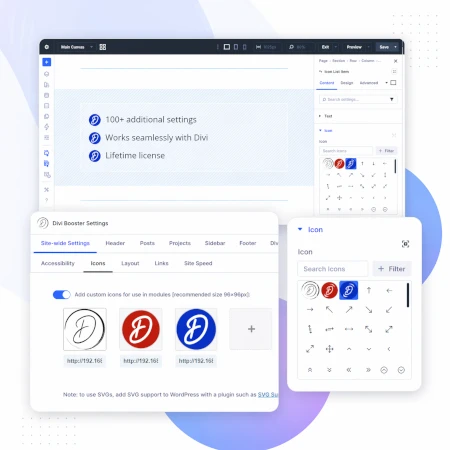
Upload your own custom icons
Use icons across multiple Divi modules

Blog & Content Enhancements
Improve how your blog content looks and works
List tags in your blog modules
Filter the blog module by author
Customize pagination text


Gallery & Media Control
Take full control of images and sliders
Customize sliders and navigation
Control image sizing and layout
Disable unwanted animations

Accordion & Counters
Make interactive elements more flexible
Start accordions open or closed
Let users fully collapse sections
Customize counter behavior and timing

Video Module Enhancements
Get more control over your video modules
Autoplay, mute, and loop videos
Hide player controls
Limit YouTube related videos
Contact Form Improvements
Make your forms more powerful and reliable
Send confirmation emails automatically
Block spam by email, domain, or keyword
Developer & Advanced Tools
Extra control when you need it
Built-in CSS manager
Optimize JS and CSS loading
Import and export settings
And Lots, Lots More…
Divi Booster comes packed with everything you need to build more powerful and awesome Divi sites in less time
Trusted by Divi Users Worldwide
"Divi Booster is a great product and we’ve never really needed support for it but, on the one occasion we needed advice, Dan was super helpful."
"This plugin does exactly what I needed it to do. I do not have any developer skills, but support was excellent and resolved all of the questions I had quickly."
"Divi Booster is fantastic. I used this plugin to improve the header area and footer area on a client's website. My client is very pleased."
Frequently Asked Questions
What is Divi Booster?
Divi Booster is a WordPress plugin that adds 100+ new features and customization options to the Divi theme. It lets you modify layouts, modules, headers, and more – without writing code.
Do I need coding knowledge to use Divi Booster?
No. Divi Booster is designed for non-developers as well as professionals. You simply install the plugin and enable the features you want – no CSS, PHP, or JavaScript required.
Does Divi Booster work with Divi 5?
Yes. Divi Booster is actively maintained and compatible with both Divi 4 and Divi 5, with regular updates to ensure ongoing compatibility.
Can I use Divi Booster on client websites?
Yes. You can use Divi Booster on client sites. The 3-site and unlimited licenses are especially popular with freelancers and agencies building multiple websites.
What kind of features does Divi Booster add?
Divi Booster adds a wide range of enhancements, including:
- Additional settings for Divi modules
- Header and navigation customization
- Blog and content improvements
- Layout and spacing controls
- Lots more icons
Overall, it gives you much more control over how Divi works – without needing custom code.
Will Divi Booster slow down my website?
No. Divi Booster is designed to be lightweight. You can enable only the features you need, so unnecessary code isn’t loaded. In some cases, it can even help improve performance by reducing the need for custom scripts.
How is Divi Booster different from other Divi plugins?
Divi Booster focuses on adding practical, real-world improvements to Divi – things users frequently need when building sites. Instead of being a niche add-on, it acts as an all-in-one toolkit to extend Divi’s core functionality.
How do I install Divi Booster?
After purchase, you download the plugin file and upload it via your WordPress dashboard (Plugins → Add New → Upload Plugin). Once activated, you can enable features directly within Divi.
Do you offer support and updates?
Yes. Divi Booster includes ongoing updates and support. The plugin has been maintained for over 10 years, with regular compatibility updates for new versions of WordPress and Divi.
Is there a refund policy?
Yes. If Divi Booster isn’t the right fit for your needs, you can request a refund within the specified refund period (90 days).
Can I enable or disable individual features?
Yes. Divi Booster is modular – you can turn features on or off individually, so you only use what you need for each site.
Where can I see the full feature list?
You can view the complete list of features here:
Does Divi Booster plugin turn off the WP theme file editor? I tried to find the option in Appearance > Editor, but it's not there anymore. Wondering if it was the plugin.
Thank you.
Hi Luiz. Divi Booster doesn't turn off the editor. I think some security plugins such as Sucuri do… perhaps it's one of them?
Dan
IS Divi Booster compatable with Divi Module Editor Pro (DMEP) plugin. I purchased Booster because I found Child Themes too much work.
DMEP seems to work by providing shortcodes to enter into your section ID or CLASS box.
Would Booster capture this CSS or would it require a Child Theme?
Thanks
Sean
Hey Sean, I haven't had a chance to play around with the Divi Module Editor Pro yet, but I would expect that will work well together. Divi Booster is designed not to interfere with other plugins (as much as possible) and I'm sure DMEP will be the same. There may of course be minor conflicts where both plugins are trying to change the same component. Let me know if you spot anything like that and I'll try to resolve it.
From my understanding DMEP handles its own CSS – it shouldn't need either Divi Booster or a child theme to handle the CSS it adds.
I use both, Divi Booster and DMEP on my website and have found no problems yet. I did run into a problem with DMEP and a recaptcha plugin.
I just purchased your plugin. Where do I download it? I have not gotten an email yet?
found it. Your emails are going into spam for some reason
Cool. I just resent your purchase email before I saw this second comment – so please ignore that. Yeah, unfortunately I have no control over email systems' spam filters and they sometimes mis-classify things as spam. If you wish to, adding my email address to your safe senders list will ensure that my emails reach your inbox. Cheers!
Is Divi Booster plugin works with all wordpress themes
Hey Ameen, Divi Booster is just for the Divi Theme by Elegant Themes. It may also work with the many child themes available for Divi. While I can't personally test Divi Booster on all these child themes, I'll be happy to try to resolve anything that doesn't work on them (probably some of the features will and some may not). Beyond that, it won't work with other non-Divi themes. If you've got a specific question about another theme, let me know and I'd be happy to try to answer it for you.
I cannot change the top header color using the option included in Divi Booster. I tried on 2 sites. Current Divi version and WP version.
Other things I tried. Using CSS Hero on it, and even clicking the "important !" button, therein.
I also tried the CSS you share for that purpose on your site, Dan.
Divi seems to block any change to it's color "scheme" in regards to the top header.
I don't get it. Did it used to work? Can you try it on a site of yours and verify it changes the top header, perhaps? You know, the small one with the email and phone #, and like secondary menu items.
I just designed an entire site for a friend, but they NEED a darker shade of orange to match their brand. And Divi locks it up into its pre-defined limits.
CSS Hero even shows me the color, but can't change it.
Help! Please? :-) Thanks for your time and how you help us through this comment section. Seriously.
Hey R, I'm not at my computer at the moment to take a look, but it sounds a lot like a caching problem. If you're using any performance plugins like WP Super Cache or W3 Total Cache, try clearing their caches (and your browser cache). Hopefully that will do the trick…
I noticed after updating Divi Booster on one site that the copyright symbol © would attract some strange characters after I saved it in the footer area.
Hey Jim, if you've got a recent version of the plugin you can avoid this by using the [copy] shortcode in the footer area to add a copyright symbol without the character issue. I'm aware of the problem and will try to fix it as soon as possible. Cheers!
Hi Dan
Just wanted to say a BIG thank you for this plugin. I purchased it today after seeing it recommended by another Divi developer and I have to say it's brilliant.
The best $12 dollars I've spent!
Imran
I just purchased this thinking that by changing the minimum height of the header, that my logo would correspondingly also expand with the header's expansion.
It did not.
Divi's normal header effect on the logo is that the logo is in its normal state, then it shrinks along with the header size upon scroll.
So is there a way to make the logo correspond in size accordingly to the size of the header?
I'm trying to solve an issue where my logo is just illegible at the default Divi sizes. I need to make the logo about 150% larger at both states.
Thanks for your time, sir. I hope there is a fix for this so I don't have to figure out a way to rework the logo.
Hey R, there is a separate setting for controlling the logo height. You can find it under "Header > Main Header > Normal Logo Height" in the Divi Booster settings.
Pardon my ignorance. I will try it soon. Thanks.
Hi Dan, I purchased divi booster a while ago, I currently have version 1.0.5 installed. I've installed the plugin in our wordpress multisite, but I read in the FAQ that it doesn't support multisite? It seems to work fine apart from one thing, how do I get the updates? If I click "check for updates" I get a message that there's a new version of the plugin, but how and where do I download it?
Hi Karin, thanks for the feedback about multisite. I've been doing some testing and it seems like Divi Booster does indeed play nicely with multisite. The only thing that I'm aware of that doesn't work is the updates. I'm currently using a third-party library to handle the updates, but it doesn't seem to work with multisite. Until I can implement an alternative update mechanism, I'm afraid it will be necessary to do manual updates. You can find details on how to do manual updates, and get information on the status of multisite support, on the following post: https://divibooster.com/using-divi-booster-on-wordpress-multisite/
Any chance in the "Custom CSS for" section you can add a width of "981 and higher? This was when Divi changes from "desktop to mobile" your custom CSS changes will too.
I tried doing a combination of device and screen width but it didn't sen to work properly.
Hey Robert, I've just updated the "Desktop" category to be 981px and higher. You're right, this is the correct point where it switches to desktop mode. Cheers!
Dan,
I just purchased your Divi Booster plug-in to simply change the height of sliders. Wow. Simple. Works. Worth every penny.
I am already seeing how many other tools you provide.
Thanks,
Tom
if the plugin doesnt work for my over modified divi instalation i cant ask you for return my money?
how is that done to international clients?
Hi wakowrz. I'll be more than happy issue a refund if the plugin isn't working out for you. Just message me with the purchase details and I can do a paypal refund to the original email address used.
Also, if you are able to send me any details of the problems you're having, perhaps I can find a solution that would let them work on your installation.