
Divi Booster
Customize Divi Without Code - Build Better Sites Faster
- Add powerful new Divi features instantly
- Customize headers, layouts, modules & mobile
- Save hours on every site build
Compatible with Divi 4 & 5
Compatible with Divi 4 & 5
WP 6.9+ Compatible
Why Divi Booster?
Saves You Time
Build your site faster with less effort:
- Fix common Divi issues in seconds
- Avoid hunting for code snippets
- Skip hours of CSS and troubleshooting
Less time fixing. More time building.
Packed with Features
Get the settings Divi is missing:
- Add 100+ new Divi settings
- Extend modules with powerful settings
- Control every part of your site
Everything you need in one plugin.
Easy to Use
Using Divi Booster is simple:
- Install the plugin
- Enable the features you want
- Instantly improve your site
No coding. No complexity.
"Divi Booster is a great product and we’ve never really needed support for it but, on the one occasion we needed advice, Dan was super helpful." – Will Nuttall, Absolute Media
Trusted by 33,000+ users on 75,000+ sites for over 10 years
See what you can do with Divi Booster
Add powerful new controls across Divi and its modules – without writing code.
Enhanced Divi Modules
Add powerful new controls to Divi’s built-in modules
Extend blog, gallery, video, and more
Add missing settings directly where you need them
Customize modules without CSS

Header & Navigation
Customize your Divi header in minutes – no code required
Rearrange header elements
Customize sticky header behavior
Improve dropdown menus and spacing


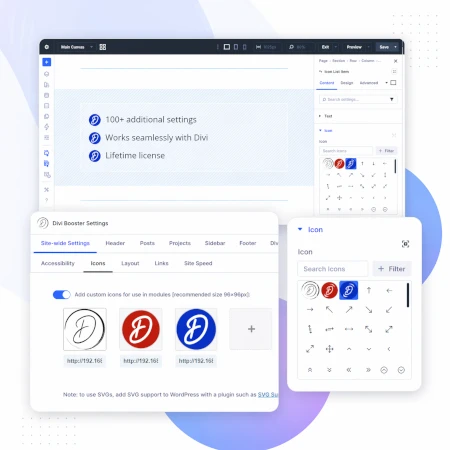
Social & Custom Icons
Add and customize icons across your site
250+ additional social icons
Upload your own custom icons
Use icons across multiple Divi modules

Blog & Content Enhancements
Improve how your blog content looks and works
List tags in your blog modules
Filter the blog module by author
Customize pagination text


Gallery & Media Control
Take full control of images and sliders
Customize sliders and navigation
Control image sizing and layout
Disable unwanted animations

Accordion & Counters
Make interactive elements more flexible
Start accordions open or closed
Let users fully collapse sections
Customize counter behavior and timing

Video Module Enhancements
Get more control over your video modules
Autoplay, mute, and loop videos
Hide player controls
Limit YouTube related videos
Contact Form Improvements
Make your forms more powerful and reliable
Send confirmation emails automatically
Block spam by email, domain, or keyword
Developer & Advanced Tools
Extra control when you need it
Built-in CSS manager
Optimize JS and CSS loading
Import and export settings
And Lots, Lots More…
Divi Booster comes packed with everything you need to build more powerful and awesome Divi sites in less time
Trusted by Divi Users Worldwide
"Divi Booster is a great product and we’ve never really needed support for it but, on the one occasion we needed advice, Dan was super helpful."
"This plugin does exactly what I needed it to do. I do not have any developer skills, but support was excellent and resolved all of the questions I had quickly."
"Divi Booster is fantastic. I used this plugin to improve the header area and footer area on a client's website. My client is very pleased."
Frequently Asked Questions
What is Divi Booster?
Divi Booster is a WordPress plugin that adds 100+ new features and customization options to the Divi theme. It lets you modify layouts, modules, headers, and more – without writing code.
Do I need coding knowledge to use Divi Booster?
No. Divi Booster is designed for non-developers as well as professionals. You simply install the plugin and enable the features you want – no CSS, PHP, or JavaScript required.
Does Divi Booster work with Divi 5?
Yes. Divi Booster is actively maintained and compatible with both Divi 4 and Divi 5, with regular updates to ensure ongoing compatibility.
Can I use Divi Booster on client websites?
Yes. You can use Divi Booster on client sites. The 3-site and unlimited licenses are especially popular with freelancers and agencies building multiple websites.
What kind of features does Divi Booster add?
Divi Booster adds a wide range of enhancements, including:
- Additional settings for Divi modules
- Header and navigation customization
- Blog and content improvements
- Layout and spacing controls
- Lots more icons
Overall, it gives you much more control over how Divi works – without needing custom code.
Will Divi Booster slow down my website?
No. Divi Booster is designed to be lightweight. You can enable only the features you need, so unnecessary code isn’t loaded. In some cases, it can even help improve performance by reducing the need for custom scripts.
How is Divi Booster different from other Divi plugins?
Divi Booster focuses on adding practical, real-world improvements to Divi – things users frequently need when building sites. Instead of being a niche add-on, it acts as an all-in-one toolkit to extend Divi’s core functionality.
How do I install Divi Booster?
After purchase, you download the plugin file and upload it via your WordPress dashboard (Plugins → Add New → Upload Plugin). Once activated, you can enable features directly within Divi.
Do you offer support and updates?
Yes. Divi Booster includes ongoing updates and support. The plugin has been maintained for over 10 years, with regular compatibility updates for new versions of WordPress and Divi.
Is there a refund policy?
Yes. If Divi Booster isn’t the right fit for your needs, you can request a refund within the specified refund period (90 days).
Can I enable or disable individual features?
Yes. Divi Booster is modular – you can turn features on or off individually, so you only use what you need for each site.
Where can I see the full feature list?
You can view the complete list of features here:
Hi Dan, I have to say first of all I have had Booster for over a year now and couldn't be happier about having purchase it, its become a staple in all my divi sites. I am, however running into a bit of trouble with the latest update, I keep getting the following error: "Update Failed: Download failed. cURL error 3: malformed" is there something I'm missing? If I delete the plugin and upload the latest version will the setup be wiped? Thanks a lot!
Hi mariarangok, I'm glad you're happy with the plugin. The error was triggered by the recent WP update, but I believe I've now fixed it through a change on my update server, so you should be able to update through the WordPress plugins page. For future reference, your settings won't be wiped if you delete / reinstall the plugin – they are saved in the database and so will be available to and picked up by the new version.
Hi
Divi Booster has been working great, thank you.
Just seem to have come across a slight glitch this morning on two of my sites where it has failed to update with the error message
An error occurred while updating Divi Booster: Download failed. cURL error 3: malformed
Hi Bernard, sorry about this – the recent WordPress update introduced a change that was incompatible with my update server. I've made a change on my update server and the updates should now be working again. Let me know if you continue to have any issues with it. Cheers.
Thanks Dan
That seems OK now
Bernard
Good morning Dan,
Just in case you didn't get the information yet, latest Divibooster update returns a : cURL error 3: malformed
Thanks,
Thanks Laurent, I've now fixed this with a change on my update server, so the updates should be working again. Cheers.
All fine (as usual)
thanks again Dan
When I try to access the divi library, I get the following error "You are not allowed to edit posts in this post type."
Can anyone help? I can no longer load from the library and create new posts.
Hi Tris, if you look got to "Divi > Role Editor" from your WP admin, you'll find the Divi Theme's permission editor. I'd check through there first and make sure that you are not being blocked from editing anything. Hopefully that will be the issue, but let me know if you aren't able to fix it that way.
Hi Dan,
I'd love some help please, I've just made a huge mistake!! I was trying to update Divi Booster and since it won't do it automatically I followed the instructions you wrote in a post (https://divibooster.com/updating-divi-booster-plugin/)
I deactivated and deleted the original plugin like you said in your post, but I did it the wrong way around- I should have made sure that I could download the latest version first. When I went to re-download the plugin from my original email it won't work because it says "sorry your download link has expired"
I'm so frustrated that I deleted it first, and now my site isn't looking right!!
Could I please be emailed another link to download it or could you show me somewhere on the site where I could do it? It's not showing up when I search it in Wordpress plugins.
Thanks so much,
Heidi
Hi Heidi, sorry to hear you had this trouble! I've just resent your purchase confirmation email which will contain a fresh download link. For future reference, you can also access the latest version of the plugin at any time from the account section of my site:
https://divibooster.com/your-account/
If you don't already have an account, register for one using the email address you used to purchase and you'll be able to see your purchase history with download links, etc.
Is Divi Booster going to be needed when Divi 3.0 is realeased?
**released
Hi Eve, while we're all still waiting to see exactly what Divi 3.0 will bring, it looks like the main new feature is going to be the frontend editor, a visual alternative to Divi Builder which should make using the current Divi options easier. I haven't seen any indication that there will be new features added that would replace the 100+ features that Divi Booster adds, and it seems very unlikely that this would be the case. Even if they do replace a few of them, I'll be continuing to develop Divi Booster and add new features to take advantage of whatever Divi 3.0 has to offer, so hopefully it'll continue to prove useful long into the future. Thanks!
Dan,
Just bought & downloaded DIVI Booster… made more good progress than I made ALL last week. I need a little help though, I want to overlay some text and I can't get it to move. I want it in the lower right, I can get it to move then it goes off the page. Would you look at it (www.janicecrookcpa.com)and give me a hint or two?
Glad to hear it, David :) I'm not 100% on what you're asking – can you clarify for me a bit? Is is the text overlaying the slides that you are trying to move? And move it to the lower right corner of the slide, or of the whole page? Cheers!
hey , the divi booster will solve my "you are not allow to edit" on divi library problem?
Hi zion, this isn't something Divi Booster can fix. I'm not sure exactly what the problem you are having is, but I'd suggest first checking that you have permission to access the Divi Library in the Role Editor ("Divi > Role Editor"). If that doesn't help, would you be able to give me some more details on what exactly you're clicking on, etc, when the error occurs?
Dan, this may be the same problem or I'm just not looking in the right place. I received you Purchase Receipt and clicked you link for "Divi Booster." It downloads fine but I never get a .zip file. I get a folder called "divi-booster" but no .zip file can be found.
Hi Doug, the linked file itself is the zip file. I think the problem is that your browser is automatically opening the zip file – so you just see the folder contained in the zip file. This is particularly common on macs. Assuming you are indeed using a mac, you should be able to get the zip file itself by holding down control and clicking on the link. Then choose "Download Linked File as…" to save the zip file to your computer. Alternatively you can prevent Safari from automatically opening zip files by going to Safari > Preferences > General and unchecking "Open Safe Files After Downloading".
That worked like a charm and I found the link on your site. Thanks much.
Hey Dan,
I sent you an email the other week as the download link i have seems to have stopped working. Can you point me in the direction of a new download link please?
Hi Jamie, sorry I wasn't able to answer your earlier message. I've just resent you purchase confirmation email which contains a fresh download link. You can also access the latest version of the plugin at any time by registering for an account on this site (link in the header) with the same email address you used to purchase the plugin. I hope that helps.
Hi,
My wordpress site threw this error:
Fatal error: Using $this when not in object context in /Users/jaywasack/FindableWebsites/WebsiteDevelopment/findablewebsites/wp-content/plugins/divi-booster/fixes/070-fix-divi-simple-lightbox/settings-plugins.php on line 1
Any advice on how to fix it?
Hi Jay, sorry you're getting this error. I'm not sure exactly why this has happened, but it looks like you're on an old version of the plugin. The latest version of Divi Booster (2.2.7) implements the affected feature in a different way and should not result in this error. I'd try updating first to see if that solves the problem for you. Alternatively, if you are not using the Simple Lightbox plugin, you should be able to stop the error by disabling the affected feature (found in "Plugins > Other Plugins > Fix Simple LightBox overlap with Divi top header). Let me know if the problem persists after that.
Hi
I have purchased DIVI booster … logged in via the info in the email … changed password BUT just get the opportunity to buy again…and again …. how to I download the plugin??
Mike Hurst
Glad the link came through for you, Mike. Yes, the link comes in a separate email to the paypal receipt and the site login details.