
Divi Booster
Customize Divi Without Code - Build Better Sites Faster
- Add powerful new Divi features instantly
- Customize headers, layouts, modules & mobile
- Save hours on every site build
Compatible with Divi 4 & 5
Compatible with Divi 4 & 5
WP 6.9+ Compatible
Why Divi Booster?
Saves You Time
Build your site faster with less effort:
- Fix common Divi issues in seconds
- Avoid hunting for code snippets
- Skip hours of CSS and troubleshooting
Less time fixing. More time building.
Packed with Features
Get the settings Divi is missing:
- Add 100+ new Divi settings
- Extend modules with powerful settings
- Control every part of your site
Everything you need in one plugin.
Easy to Use
Using Divi Booster is simple:
- Install the plugin
- Enable the features you want
- Instantly improve your site
No coding. No complexity.
"Divi Booster is a great product and we’ve never really needed support for it but, on the one occasion we needed advice, Dan was super helpful." – Will Nuttall, Absolute Media
Trusted by 33,000+ users on 75,000+ sites for over 10 years
See what you can do with Divi Booster
Add powerful new controls across Divi and its modules – without writing code.
Enhanced Divi Modules
Add powerful new controls to Divi’s built-in modules
Extend blog, gallery, video, and more
Add missing settings directly where you need them
Customize modules without CSS

Header & Navigation
Customize your Divi header in minutes – no code required
Rearrange header elements
Customize sticky header behavior
Improve dropdown menus and spacing


Social & Custom Icons
Add and customize icons across your site
250+ additional social icons
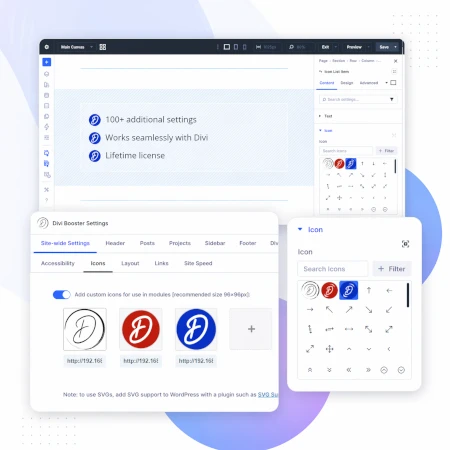
Upload your own custom icons
Use icons across multiple Divi modules

Blog & Content Enhancements
Improve how your blog content looks and works
List tags in your blog modules
Filter the blog module by author
Customize pagination text


Gallery & Media Control
Take full control of images and sliders
Customize sliders and navigation
Control image sizing and layout
Disable unwanted animations

Accordion & Counters
Make interactive elements more flexible
Start accordions open or closed
Let users fully collapse sections
Customize counter behavior and timing

Video Module Enhancements
Get more control over your video modules
Autoplay, mute, and loop videos
Hide player controls
Limit YouTube related videos
Contact Form Improvements
Make your forms more powerful and reliable
Send confirmation emails automatically
Block spam by email, domain, or keyword
Developer & Advanced Tools
Extra control when you need it
Built-in CSS manager
Optimize JS and CSS loading
Import and export settings
And Lots, Lots More…
Divi Booster comes packed with everything you need to build more powerful and awesome Divi sites in less time
Trusted by Divi Users Worldwide
"Divi Booster is a great product and we’ve never really needed support for it but, on the one occasion we needed advice, Dan was super helpful."
"This plugin does exactly what I needed it to do. I do not have any developer skills, but support was excellent and resolved all of the questions I had quickly."
"Divi Booster is fantastic. I used this plugin to improve the header area and footer area on a client's website. My client is very pleased."
Frequently Asked Questions
What is Divi Booster?
Divi Booster is a WordPress plugin that adds 100+ new features and customization options to the Divi theme. It lets you modify layouts, modules, headers, and more – without writing code.
Do I need coding knowledge to use Divi Booster?
No. Divi Booster is designed for non-developers as well as professionals. You simply install the plugin and enable the features you want – no CSS, PHP, or JavaScript required.
Does Divi Booster work with Divi 5?
Yes. Divi Booster is actively maintained and compatible with both Divi 4 and Divi 5, with regular updates to ensure ongoing compatibility.
Can I use Divi Booster on client websites?
Yes. You can use Divi Booster on client sites. The 3-site and unlimited licenses are especially popular with freelancers and agencies building multiple websites.
What kind of features does Divi Booster add?
Divi Booster adds a wide range of enhancements, including:
- Additional settings for Divi modules
- Header and navigation customization
- Blog and content improvements
- Layout and spacing controls
- Lots more icons
Overall, it gives you much more control over how Divi works – without needing custom code.
Will Divi Booster slow down my website?
No. Divi Booster is designed to be lightweight. You can enable only the features you need, so unnecessary code isn’t loaded. In some cases, it can even help improve performance by reducing the need for custom scripts.
How is Divi Booster different from other Divi plugins?
Divi Booster focuses on adding practical, real-world improvements to Divi – things users frequently need when building sites. Instead of being a niche add-on, it acts as an all-in-one toolkit to extend Divi’s core functionality.
How do I install Divi Booster?
After purchase, you download the plugin file and upload it via your WordPress dashboard (Plugins → Add New → Upload Plugin). Once activated, you can enable features directly within Divi.
Do you offer support and updates?
Yes. Divi Booster includes ongoing updates and support. The plugin has been maintained for over 10 years, with regular compatibility updates for new versions of WordPress and Divi.
Is there a refund policy?
Yes. If Divi Booster isn’t the right fit for your needs, you can request a refund within the specified refund period (90 days).
Can I enable or disable individual features?
Yes. Divi Booster is modular – you can turn features on or off individually, so you only use what you need for each site.
Where can I see the full feature list?
You can view the complete list of features here:
HI can I get an key for my booster plugin? I bought a licence in August but can't find it! Thanks!
Hi Lorna, I've just resent your purchase confirmation email, which contains the license key. It should be hitting your email inbox right about now.
Can you guys add HomeStars to your list of social media icons for Divi Booster. https://homestars.com/
Its big here in Canada for the Home services industries.
Hey Geoff, I'll try to get it added in a future version of the plugin. Cheers.
Hi, Dan. I searched YouTube and didn't see any vids on using DiviBooster. Do you have any? Thanks!
I don't have any videos at the moment, I'm afraid. I'll hopefully get some put together in the future. Cheers!
Hi Dan,
I bought the Divi Booster plugin about 2 years ago and can't find my license key. Can you send it to me please. Let me know what info you need to identify my purchase.
Thanks,
Jan
Hi Jan, I was able to track down your purchase from your email address. I've just resent your purchase confirmation email, which contains the license key, so you should receive it shortly. I hope that helps.
Trying to get a good score from the Page Speed Insights, I also downloaded the w3 Total Cache to help with the speed. Can I use the both plug ins on my site? Would it affect anything in the background in terms of minifying and cache? Would the Divi booster will also help for image optimisation and above the fold CSS.
Hi Ryazan, the plugins will work together without affecting anything. Divi Booster allows you to enable gzip compression to speed up page downloads, but I believe there is also an option for this in W3 Total Cache, so you should only need to use one or the other. For image optimisation, I'd suggest checking out WP Smush:
https://en-au.wordpress.org/plugins/wp-smushit/
It can automatically compress images when you upload them and process all your existing images.
I'm hoping to add more Divi-specific performance enhancements in the future, such as improving CSS loading, etc.
HI can I get an key for your booster update? I bought a licence about 18 months ago.
Julie Turner
Hi Julie, I've just resent your purchase confirmation email, which contains your license key and a download link for the latest version of the plugin. Cheers.
Hi, I'm getting this error when using Divi 3.0.19, Divi Booster 1.3.8 and WP 4.6.1: Uncaught Error: No handler option passed to Waypoint constructor – waypoints.min.js. Error message goes away if Divi Booster is disabled. Any idea what could be going wrong?
Thanks.
Hi Rikard, you're using quite an old version of Divi Booster. Recent versions of Divi have changed the way the header works, but the old version of Divi Booster isn't aware of these changes, resulting in the error. This conflict is now fixed in Divi Booster, so if you update to the latest version of Divi Booster the error should go away. For update instructions, please see:
https://divibooster.com/updating-divi-booster-plugin/
Does Divi Booster work with the EXTRA theme as well?
Hey Charles, it does to some extent – as outlined in this post:
https://divibooster.com/is-divi-booster-compatible-with-the-extra-theme/
Howdy – my company owns a license of Divi Booster and we use it on a particular site we developed for a client. That client is moving hosting to another company and we want to make sure any licenses under our name are not moved over to the company. Divi Booster being one of them. If I delete Divi Booster from Wordpress and they install their own purchased license, will that zip install automatically use their license, not our own? You used to have a license key area but apparently that's gone now…
Hi Joel, to streamline Divi Booster use I've got rid of licenses altogether. They are now no longer used by the plugin (or by me) at all. As such, it no longer matters if anyone else sees your license key – it won't benefit them in any way. Technically, if you've entered the license key previously it'll remain in the database after Divi Booster is uninstalled, and if someone were to install an older version of the plugin, it would pick up the key (very old versions would actually display the license key, while newer "old" versions will be activated, but won't display the license key). The only easy way to remove the license key from the database would be to install an old version yourself and deactivate the key (which removes it from the database). If you do want to do that and need an older version of the plugin, let me know.
Thanks – I'm not so much worried about someone seeing the key, I'm more worried that someone would continue to use our license of the plugin without purchasing one of their own.
I'll remove the plugin and provide them your URL and let them buy their own. When they install it, it should pick up all the settings and they'll be good to go.
Thanks for your response!
Sounds good, Joel! And yeah, that's right – when they install their copy it'll pick up all the settings and be good to go.
Hi Dan,
How do I go about downloading the latest copy of Divi Booster? I alway upload a copy of Divi Booster 1.7.1 then add my license key and use the auto-update?
This doesn't work now?
Cheers
Martin
Hi Martin, I've just resent your Divi Booster purchase confirmation email, which contains a link you can use to download the latest version of Divi Booster. There is no need to enter the license key on this version – auto-updates are enabled by default. If for any reason you don't get the email, you can also access the latest version of the plugin by logging in to my site at:
https://divibooster.com/your-account/
If you don't have an account, you can register for one using the email address you supplied when you purchased and your purchase history will show up.
This one is recommended add on for divi theme. Good work team divibooster
I love this plugin. I use it on any divi site I create, including my own! It's well worth the money!
Just tried to update Divi Booster and got this message:
Update Failed: Download failed. cURL error 3: malformed
I had just updated to WP 4.6 and I read online that could be the problem. Can you help?
Thanks.
Hi Randy, it looks like WP 4.6 was indeed the problem. I've made a change on my update server which seems to fix the issue. You should be able to update correctly now, but let me know if not. Cheers.