
Divi’s Accordion module does not include a built-in option for adding FAQPage schema. In this guide, I’ll show you how to add the required JSON-LD markup using a simple, no-code plugin option.
The feature is available either as the standalone Divi Accordion FAQ Schema plugin or as part of Divi Booster. Both add the same FAQ Schema option to the Accordion module, so you can use whichever best matches your setup.
The schema is generated from the questions and answers already displayed in your Accordion module, helping you keep the visible FAQ content and structured data consistent. I’ll also show you how to validate the markup after publishing your page.

Important: FAQ schema helps machines understand the structure of your FAQ content, but it does not guarantee a special appearance or higher ranking in search results.
Add FAQ Schema to the Divi Accordion Module Without Code
This method shows how to add FAQ schema to a Divi Accordion module using our FAQ schema option. It is a straightforward, no-code approach that lets you display FAQ content normally on the page while also outputting the correct JSON-LD structured data for search and AI engines.
Note that this method is currently for Divi 5 only – it won't work with Divi 4 or earlier.
Install the Feature
Divi does not currently provide a built-in FAQ schema setting for its Accordion module. You can add this feature either by installing the standalone Divi Accordion FAQ Schema plugin or by using Divi Booster, which now includes the same functionality. In either case, an Enable FAQ Schema option is added directly to the Accordion module settings so you can generate the corresponding JSON-LD without writing or maintaining custom code.
Choose the licence that covers the number of websites on which you plan to use the plugin:
Already using Divi Booster? This feature is included – there's no need to purchase the standalone plugin. You can learn more about Divi Booster here.
After installing either the standalone plugin or Divi Booster, the feature is available automatically. You can install either plugin as follows:
- Download the plugin ZIP file.
- Go to Plugins › Add New Plugin › Upload Plugin.
- Upload the ZIP file.
- Select Install Now, then Activate Plugin.
You can then follow the steps below.
Add Your Questions and Answers
Open the settings for your Accordion module. For each FAQ item:
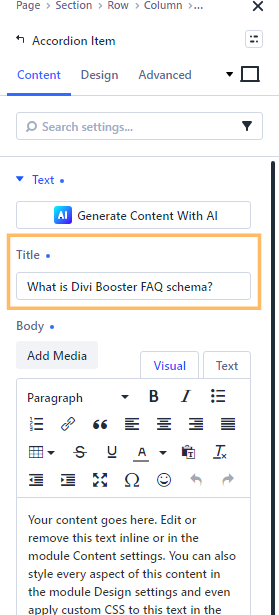
- Enter the question in the Title field.
- Enter the answer in the content editor.
- Repeat the process for each question you want to include.
The feature uses this content to automatically generate the schema, ensuring that the schema markup stays up-to-date with your visible FAQs.
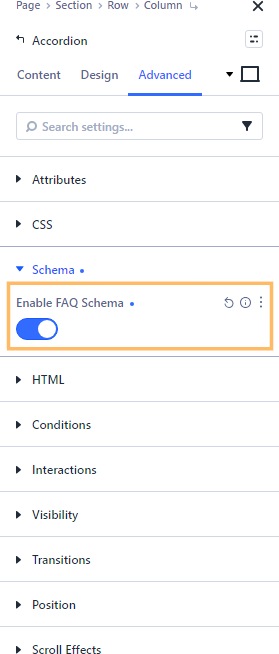
Enable FAQ Schema
Open the main Accordion module settings and select the Advanced tab. Expand the Schema section, then set Enable FAQ Schema to Yes.
The feature will generate FAQPage JSON-LD from the questions and answers in that Accordion module. You do not need to create or paste the JSON-LD manually.
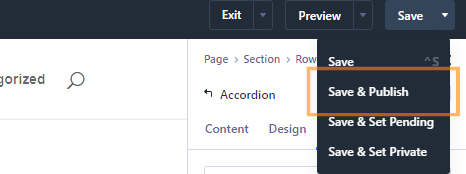
Save and Publish the Page
Save your changes to the Accordion module and when you are ready, publish your page. Use the page action bar's dropdown arrow next to the Save button and select "Save & Publish" to push your updates live.
Validate the FAQPage Markup
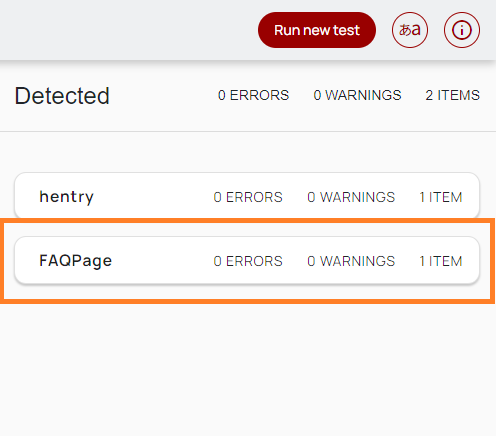
After publishing the page, copy its public URL and test it with the Schema.org Schema Markup Validator.
Check that the validator detects an FAQPage item and that each Accordion item appears as a question with an accepted answer.
You can also view the page source and search for "@type":"FAQPage" to confirm that the JSON-LD has been added, but a validator provides a more useful check than inspecting the source alone.
If the schema does not appear:
- Clear any page, plugin or CDN cache.
- Confirm that the standalone plugin or Divi Booster is active.
- Reopen the Accordion module and check that Enable FAQ Schema is switched on.
- Make sure you are testing the published page rather than a Divi preview URL.
Next Steps for Your Divi FAQ
Now that your Accordion has FAQPage schema, you may also want to improve how the FAQ behaves for visitors:
- Start the Accordion with all questions closed
Create a cleaner initial layout and let visitors choose which answer to open. - Make Accordion items fully closeable
Allow visitors to close the active question without having to open another. - Link directly to a particular FAQ answer
Send users to the relevant question from an email, support page or another section of your website. - Scroll opened Accordion items into view
Keep longer FAQ answers visible when an item above or below the current viewport opens.
Will FAQ Schema Give Me a Google Rich Result?
Google no longer displays FAQ rich results in Search. Adding valid FAQPage schema can still provide a machine-readable description of your FAQ content, but it does not guarantee improved rankings, a richer search snippet or inclusion in AI-generated answers.
It is best to add a FAQ schema only when your accordion module is actually a question and answer section, rather than trying to use it to improve the ranking of non-FAQ content.
Conclusion
You have now added FAQPage JSON-LD to a Divi Accordion module without manually writing or maintaining the schema. Because the markup is generated from the Accordion content, your visible questions and structured data can remain aligned as you update the page.
How else would you like to customise your Divi FAQ? If you are trying to change its layout, behavior, icons or navigation – or the schema is not validating correctly – leave a comment below with what you are trying to achieve.

0 Comments