
The Divi theme includes a Project custom post type, which can be displayed in a grid format using the portfolio module. If you instead want to display your projects in a table, here's an example of code for displaying projects in table format, with custom fields and links to the individual projects. I.e. this is what we're trying to achieve:

Step 1: Set up Custom Fields
To display custom fields for you projects, you can set them up using the Advanced Custom Fields plugin. Something like this:
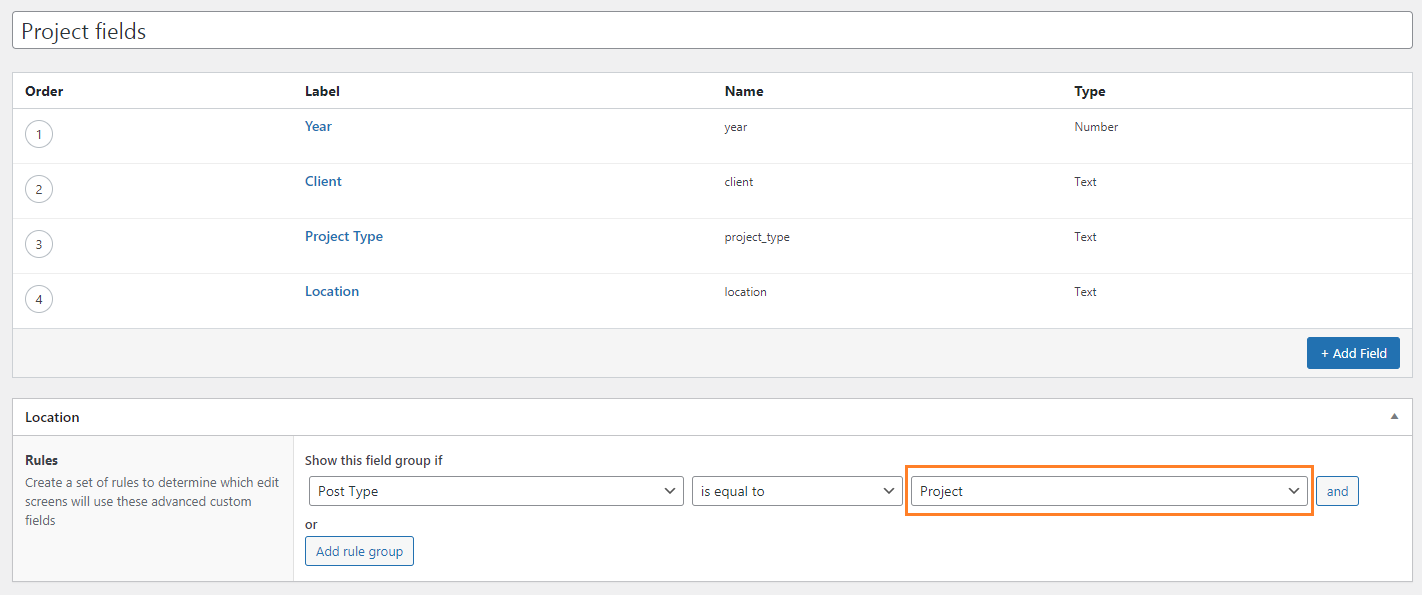
An important thing to note is that the field group must be assigned to the Project post type (as shown in orange).
2. Create Projects and Fill Out Custom Fields
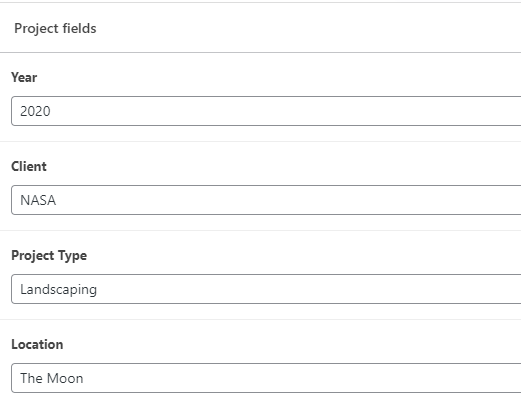
Create any projects to be displayed in the table. Enter the values of their custom fields (on the project edit screen). Like so:
3. Create a Shortcode to Return the Table HTML
To let us embed the table anywhere in the page, we'll create a shortcode "db_portfolio_table". Here's the PHP code for the example. You may well need to modify it to suit your needs.
if (!class_exists('DBPortfolioTable')) {

	class DBPortfolioTable {

		public function html() {
			return
				'<table class="sortable">'.
					$this->thead().
					$this->tbody($this->projects()).
					$this->tfoot().
				'</table>';
		}

		private function projects() {
			$result = array();
			$query = new WP_Query('post_type=project');
			while ($query->have_posts()) {
				$query->the_post();
				$result[] = array(
					'title' => get_the_title(),
					'url' => get_permalink(),
					'year' => $this->customField('year'),
					'client' => $this->customField('client'),
					'project-type' => $this->customField('project_type'),
					'location' => $this->customField('location')
				);
			}
			wp_reset_postdata();
			return $result;
		}

		private function customField($name) {
			if (!function_exists('get_field')) { return ''; } // Advanced Custom Fields plugin not found
			$value = get_field($name);
			return $value?$value:'';
		}

		private function thead() {
			return '
				<thead>
				<tr>
					<th>Project Name</th>
					<th>Year</th>
					<th>Client</th>
					<th>Project Type</th>
					<th>Location</th>
				</tr>
				</thead>';
		}

		private function tbody($projects) {
			$result = '';
			foreach($projects as $project) {
				$result .= $this->row($project);
			}
			return '<tbody id="tablecontent">'.$result.'</tbody>';
		}

		private function row($project) {
			$result = '';
			$fields = array('title', 'year', 'client', 'project-type', 'location');
			foreach($fields as $field) {
				$result .= $this->cell($project, $field);
			}
			return "<tr>{$result}</tr>";
		}

		private function cell($project, $field) {
			return '<td class="'.esc_attr($field).'">'.$this->link($project, $field).'</td>';
		}

		private function link($project, $field) {
			return '<a href="'.esc_attr($project['url']).'">'.esc_html($project[$field]).'</a>';
		}

		private function tfoot() {
			return '<tfoot></tfoot>';
		}
	}

	add_shortcode('db_porfolio_table', array(new DBPortfolioTable, 'html'));
}
Related Post: Adding PHP to the Divi Theme
4. Add Shortcode to the Page
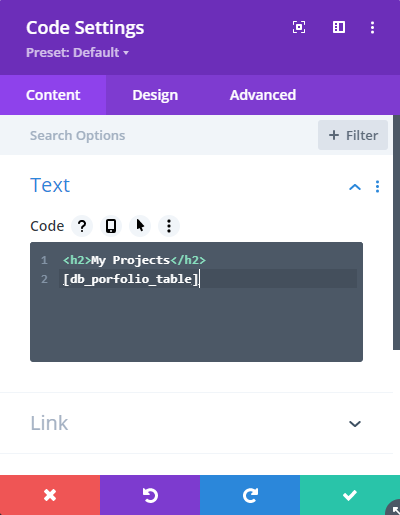
To add the table to the page, we can place its shortcode into a code module like so:


Dan thank you, this is excellent. Absolutely perfectly executed and exactly what I needed for my project. I had tried cobbling together some code but when I compared it to yours it doesn't cut the mustard like yours does.
Do you have a ko-fi page or something so I can, at the very least, buy you a coffee?
Hey Surya, I'm glad it did what you needed! I don't have a ko-fi page, but I do drink coffee, so I've sent you an email with my PayPal address. But please don't feel at all obliged to send anything – I'm just happy to have been able to help. Cheers!